
Build a review packet, not a document pile
A useful tax-planning review packet does not try to answer tax questions on its own. It gives a credentialed tax professional a clear view of your business records, current changes, forecasts, missing support, and questions that need confirmation.
Start with one searchable packet index rather than a folder full of unlabeled files. Each record should show the period, entity, source, file name or location, status, and person responsible for follow-up. Keep documented bookkeeping records and payment evidence separate from estimates, assumptions, and unresolved questions.
Good records can support financial statements, income tracking, property-basis tracking, return preparation, and items reported on a return. Prior-year documents and financial statements also help the reviewing professional understand your tax history and business financial information. This packet is for preparation and discussion. It does not determine deductions, filing duties, nexus, registration, liability, or deadlines.
Create one packet index for every record and issue
Use one spreadsheet, document checklist, or shared index as the front page of your tax-planning review packet. A visible checklist makes received items, missing items, and items needing attention easier to discuss than a long email chain.
Create one row for every document, record group, estimate, business change, or question. Include these fields:
| Packet-index field | What to record |
|---|---|
| Module | Bookkeeping, payments, payroll and contractors, assets, forecasts, prior-year documents, business changes, or Texas review topics |
| Document or issue | A plain-language description, such as “March bank statement” or “new warehouse lease” |
| Period | The month, quarter, year, or effective date covered |
| Entity | The legal business entity the item relates to |
| Source or file location | System name, folder path, secure portal location, or original document source |
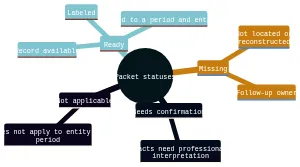
| Status | Ready, Missing, Needs confirmation, or Not applicable |
| Follow-up owner | The person who will locate, explain, upload, or raise the item at the meeting |
| Meeting question | A short question when a professional determination is needed |
Use a naming pattern that keeps related files together, such as 2026-03_Entity_BankStatement_Ready.pdf. The format is less important than consistency and a source location someone else can find. Keep the index current as files arrive; do not hide a gap by replacing it with an assumption.
Use statuses to separate evidence, estimates, and questions
A status is not a tax conclusion. It tells the reviewer what exists, what is absent, and what still needs discussion.
- Ready: The record is available, labeled, tied to a period and entity, and stored at the listed location. Example: a reconciled ledger plus the related bank statement.
- Missing: You expect the item to exist, but it has not been located or reconstructed. Name the follow-up owner and a target for locating it.
- Needs confirmation: The packet contains facts, but a credentialed tax professional must interpret them. Example: “Texas activity began in July; confirm review implications.”
- Not applicable: The module genuinely does not apply to that entity or period. Add a brief reason, such as “no employees during this period.”
Create separate rows for documented facts, estimates, and questions. An estimate should identify who prepared it, the period it covers, the inputs used, and why source records are incomplete. Do not place an estimate in the same folder or row as documented payment evidence. Incomplete records may lead preparers to consider estimates, but incomplete records do not assure that an estimate can be used. Keep the missing support visible and ask for professional review.
Checklist: Gather bookkeeping records and payment evidence
Begin with the records that explain how your books were built. The IRS says a recordkeeping system may be suited to your business if it clearly shows income and expenses. Electronic records follow the same basic recordkeeping principles as hard-copy records.
Bookkeeping records
- Transaction summary from your accounting journals, ledgers, or bookkeeping system.
- Current profit-and-loss statement, balance sheet, and any account-reconciliation workpapers available for review.
- Business bank-account statements, with the covered period, entity, and file location recorded.
- Business credit-card statements and payment-platform summaries.
- A list of accounts that are not reconciled, with the last completed period and follow-up owner.
- A short note identifying bookkeeping changes, new software, changed chart-of-account categories, or records maintained outside the usual system.
For most small businesses, the business checking account is a main source of entries in the books. It is a starting point, not a substitute for keeping the supporting records behind transactions.
Income and payment evidence
- Sales summaries, invoices, receipt books, cash-register reports, deposit information, and applicable Forms 1099-MISC.
- A gross-receipts schedule that identifies the amount and source of receipts by period.
- Paid bills, invoices, receipts, canceled checks, account statements, and electronic-payment confirmations for purchases and expenses.
- For each material purchase or expense, support showing the payee, amount, proof of payment, date, and description of the item or service.
- A list of deposits, transfers, refunds, or charges that cannot yet be matched to the books.
Organize supporting documents by year and by income or expense type, then link each group to the related index row. One record may not show every detail. Retain the combination of records that documents the transaction rather than relying on a single screenshot or bank-line description.
Boundary: Label unclear transactions as Needs confirmation. Do not decide whether a transaction has a particular tax treatment from the packet alone.
Checklist: Add payroll, contractors, assets, and forecasts
These modules connect current operations to the questions likely to arise in planning. Keep the facts and your projections distinct.
Payroll and contractor records
- Payroll registers or summaries by pay period and entity.
- Payroll tax records and payment evidence available for the period.
- Employee compensation changes, bonuses, new hires, departures, and benefit changes, labeled as documented facts.
- Contractor payment records, invoices, agreements available for review, and payment evidence.
- A list of workers or payments needing classification or reporting confirmation, without assigning a conclusion.
The IRS states that employment records must be kept for at least four years. Confirm retention needs for your circumstances with the appropriate professional. Treat payroll, contractor, identity, and account information as sensitive.
Business assets
- Asset register or list of business assets, including equipment, furniture, vehicles, or other property used in the business.
- Purchase invoices, payment support, dates placed in service when available, and sale or disposal records.
- Planned asset purchases, separated from completed purchases and labeled as forecasts.
- Questions about an asset’s use, ownership, sale, replacement, or related records.
Keep business-asset records because they are needed to verify information for annual depreciation and gain or loss on sale. The packet should preserve the records; a credentialed tax professional should confirm the relevant treatment.
Forecasts
- Revenue forecast, showing the forecast period, preparer, assumptions, and source data.
- Projected income and major expected expenses, clearly labeled as estimates.
- Owner compensation plans, payroll expectations, and contractor-payment expectations.
- Expected state activity, planned locations, and planned purchases.
- A variance note identifying major differences between current bookkeeping records and the forecast.
A planning packet can identify the entity, ownership, revenue, projected income, owner compensation, payroll, contractor payments, planned asset purchases, state activity, bookkeeping quality, and prior-year positions for professional review. Record what you know, identify the source, and flag what needs confirmation.
Checklist: Connect prior-year documents to current business changes
Prior-year documents provide context. Current business changes explain why a prior-year pattern may no longer describe the business.
Prior-year documents
- Prior-year tax returns for the entity and related financial statements available for the review.
- Prior-year bookkeeping reports and year-end account balances, if available.
- Prior-year asset schedules and records of asset sales or disposals.
- Prior-year correspondence, notices, extensions, or unresolved items that the reviewing professional should see.
- A short list of prior-year positions or questions that remain open, marked Needs confirmation.
Include prior-year returns and financial statements so the reviewing professional can understand tax history and business financial information. Record the year, entity, source location, and whether the document is complete.
Current business changes
Create a separate change log with an effective date, source, status, and owner for each item:
- Entity formation, conversion, merger, termination, or ownership change.
- New or closed business locations.
- New products, services, lines of business, or operating jurisdictions.
- Material changes in revenue, staffing, payroll, contractors, or owner compensation.
- New loans, financing, inventory practices, or significant contracts.
- Planned purchases, sales, or disposals of business assets.
- Out-of-state customers, employees, contractors, property, or operations.
Describe the change factually. For example, write “Operations began in another state on [date]” rather than assigning a filing or nexus result. End each uncertain row with a direct question for professional review.
Checklist: Flag Texas and out-of-state review topics without deciding them
Add a Texas review module whenever the business was formed in Texas, has Texas activity, has changed entity status, or may have activity outside its formation state. This is a discussion list, not a filing position.
- Entity name, entity type, formation jurisdiction, and governing-law information.
- Texas business locations, employees, property, contractors, customers, and operational dates.
- Out-of-state locations, employees, property, contractors, customers, and operational dates.
- Dates of formation, registration, conversion, merger, termination, withdrawal, or cessation of activity.
- Texas franchise tax correspondence, account information, prior reports or information reports available for review.
- A timeline of when Texas or out-of-state activity began, changed, or ended.
- Questions about nexus, registration, entity classification, and report requirements, all marked Needs confirmation.
Texas franchise-tax rules apply to taxable entities formed or organized in Texas or doing business in Texas. Record the entity type and ask a credentialed tax professional to confirm its Texas franchise-tax treatment. For a Texas review, document where the entity was formed and what law governs its internal affairs; do not use the principal office location alone to classify it as domestic or foreign.
Texas and out-of-state activity should be listed as a nexus and registration review topic. A Texas Nexus Questionnaire may be useful, but it does not provide a definitive registration answer. Texas registration can have tax, legal, and licensing consequences, so it requires appropriate professional review.
If the business is terminating, converting, or merging, flag the change and dates for current Texas professional review. If an out-of-state entity may be ending Texas nexus, record the cessation date and seek current professional confirmation promptly.
Prepare sensitive packet files for secure sharing
Before sharing, identify documents containing payroll details, contractor information, payment-account data, taxpayer identification details, banking information, or other sensitive business records. Keep an orderly packet copy in your own records, with the same file names used in the index.
Use the secure channel supplied by the reviewing practitioner when one is available, such as a client portal or secure email link. Do not send a collection of unlabeled attachments without the packet index. Upload by module where possible, then mark the corresponding row Ready only after confirming the correct file was shared.
For every sensitive file, verify the period, entity, source or file location, status, and follow-up owner before sharing. If a document is unavailable, mark it Missing. If its meaning or completeness is uncertain, mark it Needs confirmation rather than editing it to appear complete.
Turn open items into a focused meeting agenda
Your final step is to turn every Needs confirmation row into a short meeting question. Keep each question tied to a document, period, entity, and decision point. This lets the meeting focus on the items that require professional judgment instead of searching for files.
Bring questions such as:
- “Which missing bookkeeping records should we reconstruct before further review?”
- “What additional payment evidence would help explain these unmatched transactions?”
- “How should we document the assumptions behind this forecast?”
- “Which payroll or contractor records need follow-up?”
- “What asset records should we locate for this purchase, sale, or planned acquisition?”
- “What prior-year documents or unresolved items should be considered with current changes?”
- “Which facts about our Texas activity, entity, locations, or out-of-state operations need further review?”
- “Who owns each remaining Missing item, and what is the next follow-up step?”
Review the index once more before the meeting. Confirm that every row has a status and owner, estimates are clearly separated from source records, and sensitive documents are ready for secure sharing. The result is a practical handoff: organized facts, visible gaps, and focused questions for a credentialed tax professional.
Frequently asked questions about tax-planning review packets
What should be included in a tax-planning review packet?
Include bookkeeping records, payment evidence, payroll and contractor records, business assets, forecasts, prior-year documents, and any open business-change or Texas review topics. Keep each item tied to a period, entity, source, status, and follow-up owner.
How should missing records be handled in the packet?
Mark them as Missing and keep them visible. Add the period, entity, source location if known, and who is responsible for finding or reconstructing them. Do not fill gaps with assumptions.
How should estimates be labeled alongside source records?
Keep estimates separate from documented facts. Note who prepared the estimate, what period it covers, what inputs were used, and why the underlying records are incomplete. Flag it for professional review.
What Texas items should be flagged for review?
Record Texas formation, entity type, business activity, locations, and any out-of-state activity. Also flag nexus, registration, entity changes, termination, merger, or withdrawal questions for confirmation.
How detailed should payment and expense support be?
For each material transaction, keep support that shows the payee, amount, proof of payment, date, and what was purchased or received. One document may not cover everything, so keep the full set that explains the transaction.
What prior-year materials are most useful to include?
Prior-year returns, financial statements, year-end balances, asset schedules, and unresolved prior-year questions are helpful. They give the reviewing professional context for your current records and changes.
How should sensitive files be shared for review?
Use the secure portal or secure email link provided by the reviewing professional when available. Keep file names consistent with the packet index, and confirm the correct document, period, and entity before uploading.
Leave a Reply