Tag: bookkeeping records

  • Select Tax Prep Program Types for a Small-Business Tax-Planning Review Packet

    Select Tax Prep Program Types for a Small-Business Tax-Planning Review Packet

    Choose the tool category before comparing tax prep programs

    The best tax prep program is not a universal vendor choice. It is the category of tool that fits the return context you need to prepare while keeping your records and unresolved questions available for a credentialed tax professional.

    Start by mapping five distinct jobs:

    • Bookkeeping tools summarize transactions in books, journals, or ledgers.
    • Document-organizing systems retain payment evidence and other source material behind those transactions, such as invoices, receipts, paid bills, deposit records, payroll materials, and business assets records.
    • Tax-preparation software uses entered information to prepare annual income-tax return information. The IRS describes commercial software as using a question-and-answer format.
    • Sales-tax tools address collected sales tax, which Quicken distinguishes from annual federal and state income-tax preparation.
    • Credentialed professional review considers the facts and questions that a program cannot settle from an entry screen.

    This map changes the comparison question. Rather than asking which product is best, ask which category you need for the applicable entity, period, and return context. CNBC Select describes tax software as a quick, inexpensive option for straightforward situations, using a single-owner Schedule C business with no employees and minimal expenses as an example. The same source notes that a CPA or other tax professional provides customized care that software cannot replicate.

    Choose the return-preparation category first. Then confirm a specific program’s applicable tax year, entity support, return context, and service scope before relying on it.

    Compare what bookkeeping, document systems, tax software, and professional review each do

    Compare tool categories by the output each one should produce for the next category. The IRS permits a recordkeeping system suited to the business when it clearly presents income and expenses. It also says that a system should include a transaction summary, ordinarily in books such as journals and ledgers. Electronic systems follow the same basic recordkeeping principles as hard-copy records.

    Tool category Useful output Do not expect it to settle
    Bookkeeping tool A transaction summary for the entity and period Unreconciled activity or unclear classifications
    Document-organizing system Retrievable source files connected to transactions Whether a record’s tax treatment is correct
    Tax-preparation software Prompts and entered return-preparation information Missing evidence, mixed entities, or unresolved facts
    Sales-tax tool A separate sales-tax workflow where applicable Annual income-tax preparation or professional determinations
    Credentialed professional review Discussion of records, facts, and questions A substitute for maintaining source records

    A transaction summary and its source material have different roles: one summarizes activity, while the other supports the underlying entries.

    Use this as a handoff chain. First produce a readable transaction summary. Next retain the supporting documents outside the filing program. Enter only information that is ready for the applicable preparation task, and reserve unresolved matters for professional review. This keeps a program choice tied to what it can receive and produce, rather than treating it as the place where every business record must live.
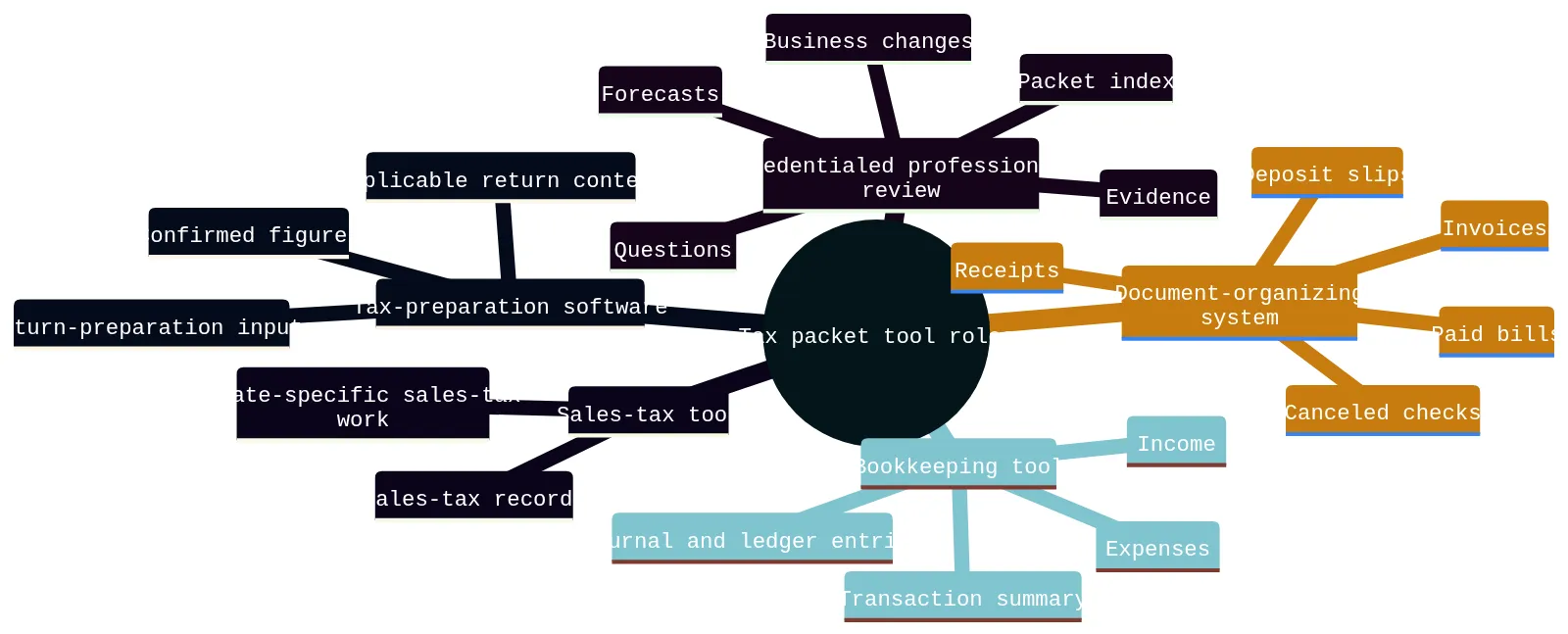
    A mind map showing five tax packet tool roles: bookkeeping, document organization, tax-preparation software, sales-tax tools, and credentialed professional review.
    Use different tool categories for different parts of the tax-planning review packet.

    Match the program type to your entity, period, and return context

    Before comparing program screens, identify two facts: which entity generated the activity and which period the packet covers. Put both at the top of your packet index. If you operate more than one business, keep records separate by business rather than combining activity because it shares an owner or bank login.

    Your entity and return context narrow the field. According to Quicken, most consumer-facing tools handle an individual Form 1040 that may include Schedule C business income, rather than separate entity-level returns for partnerships, S corporations, or C corporations. Quicken also states that TurboTax Business desktop and TaxAct business products handle entity returns separately from personal returns. These are category-level starting points, not a current eligibility determination. Confirm applicable-year forms, entity support, state availability, and product scope directly with the vendor before relying on a program.

    Use this decision boundary:

    • Single-owner activity tied to an individual return: a consumer-facing individual-return tool may be worth evaluating if your records are complete and the situation is straightforward. Confirm current form support.
    • Separate partnership, S-corporation, or C-corporation return context: begin with programs that explicitly support the separate entity return for the applicable year. Do not assume an individual-return product covers it.
    • More than one entity or a recent entity change: maintain separate folders, separate transaction summaries, and separate question lists. Ask a credentialed tax professional how the facts should be handled.
    • Unclear entity or period: pause program selection. Mark the item Needs confirmation and establish the entity and period first.

    A tax program may ask questions efficiently, but it cannot repair a packet that mixes entities, combines years, or substitutes estimates for records.

    Use five questions to narrow your tax prep program options

    Use this path before committing time to a specific program.

    1. What entity and period does this packet cover? Write the legal or operating entity name used in your records and the exact tax year or other review period. If business activity changed entities during the period, keep the change visible and add a professional-review question.

    2. Are the bookkeeping records complete enough to summarize activity? Identify the transaction summary, the accounts included, and any unreconciled or uncategorized activity. Do not use a tax program as a substitute for locating the underlying bookkeeping records.

    3. Can you find prior-year documents? Prior-year documents provide context for the next review. Compatibility can change by version and return type, so confirm current import limitations before making it a deciding factor.

    4. Do you need professional review rather than software prompts alone? A program may be a preparation tool, while a credentialed tax professional reviews the factual context and questions. This matters when records are incomplete, the entity is unclear, activity spans locations, or a business change needs discussion.

    5. Does the vendor currently support this exact use? Confirm the applicable tax year, entity return type, state scope, imports, service limits, and any professional-assistance boundaries. For example, TurboTax lists current limitations for its Expert Assist Business and Expert Full Service Business products that include C corporations and entities electing C-corporation treatment, trusts and estates, tax-exempt entities or nonprofits, and returns requiring more than five state filings. Treat vendor statements as product-specific and time-sensitive.

    If one answer remains uncertain, your next step is not to guess. Add the uncertainty to the packet index, assign a follow-up owner, and bring it to professional review.

    Build a tax-planning review packet index for records and questions

    Use a tax-planning review packet index as a program-selection record, not as a filing checklist. Its purpose is to show which information is ready for a program, which material remains supporting evidence, and which items should go to a credentialed tax professional before you select a product.

    Information group Selection question What to record
    Transaction summary Does the program fit the entity and period shown in the summary? Entity, period, report name, and included accounts
    Supporting documents Can the source material remain retrievable outside the program? Source location and related transaction group
    Prior-year documents Is a usable prior-year file format available for the program you are considering? Return type, tax year, and file format
    Forecasts and open questions Should this stay outside completed-period preparation pending review? Assumption or factual question, period, and follow-up owner

    For every row, record the entity, period, source, status, file location, and follow-up owner. This makes the program decision depend on the information you actually hold rather than on a broad product description.

    Use the index to define program inputs

    Transaction summaries identify the preparation context. The IRS says a suitable recordkeeping system clearly shows income and expenses and includes a transaction summary, ordinarily in books such as journals and ledgers. Identify the summary for the selected entity and period before evaluating program prompts.

    Supporting documents remain evidence. Keep the source files connected to the related transaction summary.
    Prior-year files are only one comparison factor. Note whether you have a prior-year data file, PDF return, or scanned paper return. Confirm current version and return-type limitations before using any prior-year import capability as a deciding factor.

    Forecasts are not completed-period inputs. Record the forecast period and source, then keep unresolved questions available for credentialed professional review. A program choice should not turn a forecast or an unanswered question into a documented fact.

    Keep Ready, Missing, and Needs confirmation items separate

    Apply an input-boundary test to each information group before using it to compare or enter information in a tax-preparation workflow. This is not a conclusion about tax treatment. It identifies whether the item helps establish program fit, remains evidence, or requires professional review.

    Input boundary Use it when Effect on program selection
    Ready to evaluate The item has an identified source and belongs to one entity and period Compare the program against the applicable input and return context
    Evidence retained The file supports a figure or explains activity Keep it retrievable with the related transaction summary
    Needs confirmation The entity, period, purpose, amount, or factual context is unclear Do not treat a program prompt as an answer to the question
    Source unavailable Expected material is unavailable Record what is absent before relying on the information
    Outside this comparison The item belongs to another entity or period, or does not apply Exclude it from this program decision and retain the reason

    For example, an account-statement payment can show that a payment occurred while its business purpose still needs confirmation. A projected equipment purchase belongs in a forecast discussion, not in completed-period asset information. A remembered expense without available support should remain marked Source unavailable rather than becoming a program entry.

    It also says that retention depends on what a document records and that records must be kept as long as needed to prove income or deductions on a return.

    This test distinguishes a program-selection decision from a record-review process. Select a program only when you can identify the entity and period it must address, the information it may receive, the evidence that stays available, and the questions that remain for professional confirmation.

    Recognize what tax software cannot settle

    Treat the limits of a program as part of the selection decision. Commercial tax-preparation software can support electronic filing, and the IRS describes commercial software as using a question-and-answer format. Those functions organize preparation only after you identify the correct entity, period, and available information.

    Use three stop checks before relying on a program answer:

    1. Input stop: Do you have a documented answer for this prompt? FreeTaxUSA states that users are responsible for complete and accurate entries and that it does not assume liability for user-generated errors.
    2. Context stop: Does the answer belong to this entity, period, and return context? A prompt cannot resolve mixed-entity records, a missing source document, or an unclear business change.
    3. Scope stop: Is this the right workflow for the obligation in question? Quicken distinguishes annual federal and state income-tax preparation software from sales-tax compliance software; do not assume one workflow completes the other.

    Nor does a program’s ability to accept an entry establish that the entry is complete or supported.

    CNBC Select states that a CPA or other tax professional offers customized care that tax software cannot replicate. For Texas franchise tax, nexus, entity changes, locations, or out-of-state activity, document the relevant facts and use professional review to confirm what those facts mean. Do not select an answer merely because a generic program prompt appears to fit.

    Choose a program with defined input boundaries

    Choose among tax prep program types by defining the preparation boundary first. Identify the entity and period, locate the transaction summary, and decide whether the available information belongs in a preparation workflow, remains supporting evidence, or needs professional confirmation.

    A tax-planning review packet supports that decision without becoming the decision itself. Use the packet index to compare each program against the inputs you have, not to assume that every file belongs in the program. Keep forecasts separate from completed-period information, and leave unavailable or unclear material visible. For electronic records, IRS Publication 583 says a storage system must index, store, preserve, retrieve, and reproduce records in legible format.

    Bring these professional-review questions when relevant:

    • What facts should we provide about Texas franchise tax?
    • Do our activities, customers, locations, or out-of-state operations raise a nexus question?
    • Did an entity change, new location, or business expansion create information that needs review?
    • Which missing records or unclear payments should be resolved before preparation proceeds?

    The useful outcome is not a universal program recommendation. It is a program type selected for a defined entity, period, and preparation context, with evidence and unresolved questions kept available for credentialed tax professional review.

    Frequently asked questions about tax prep programs and review packets

    What should I put in a tax-planning review packet before a meeting?

    Label each item by entity, period, source, status, and follow-up owner so the reviewer can see what is documented and what still needs confirmation.

    How do I tell whether a tax prep program fits my business entity?

    Start with the entity that created the activity and the period the packet covers. Consumer-facing tools often handle individual returns with business income, while separate entity returns need products that explicitly support that return type for the applicable year. Confirm current form support before relying on any program.

    Can bookkeeping software replace tax-preparation software?

    No. Bookkeeping tools summarize transactions and help you keep the source records organized. Tax-preparation software uses the information you enter to prepare return inputs. Keep the two jobs separate so your records stay usable for professional review.

    What should stay marked as missing or needs confirmation?

    Anything without a readable source, a clear period, or a clear business purpose should stay visible as missing or needs confirmation. Do not fill gaps with estimates, memory, or assumed treatment. That keeps the packet honest and easier to review.

    What records are most important for receipts, payroll, and assets?

    For payments and expenses, keep proof of payment, dates, amounts, payee details, and a description of the item or service. For payroll and contractor records, keep the available payroll materials and related payment records. For assets, keep the records needed to identify the property and support depreciation or sale calculations.

    When should I raise Texas franchise tax, nexus, or location questions?

    Bring them up whenever the business has Texas activity, out-of-state activity, entity changes, or new locations. Document the facts in the packet and ask the credentialed tax professional to confirm the tax implications rather than guessing from the software.

  • Tax Prep Services Checklist: Build a Meeting-Ready Tax-Planning Review Packet

    Tax Prep Services Checklist: Build a Meeting-Ready Tax-Planning Review Packet

    Build a review packet, not a document pile

    A useful tax-planning review packet does not try to answer tax questions on its own. It gives a credentialed tax professional a clear view of your business records, current changes, forecasts, missing support, and questions that need confirmation.

    Start with one searchable packet index rather than a folder full of unlabeled files. Each record should show the period, entity, source, file name or location, status, and person responsible for follow-up. Keep documented bookkeeping records and payment evidence separate from estimates, assumptions, and unresolved questions.

    Good records can support financial statements, income tracking, property-basis tracking, return preparation, and items reported on a return. Prior-year documents and financial statements also help the reviewing professional understand your tax history and business financial information. This packet is for preparation and discussion. It does not determine deductions, filing duties, nexus, registration, liability, or deadlines.

    Create one packet index for every record and issue

    Use one spreadsheet, document checklist, or shared index as the front page of your tax-planning review packet. A visible checklist makes received items, missing items, and items needing attention easier to discuss than a long email chain.

    Create one row for every document, record group, estimate, business change, or question. Include these fields:

    Packet-index field What to record
    Module Bookkeeping, payments, payroll and contractors, assets, forecasts, prior-year documents, business changes, or Texas review topics
    Document or issue A plain-language description, such as “March bank statement” or “new warehouse lease”
    Period The month, quarter, year, or effective date covered
    Entity The legal business entity the item relates to
    Source or file location System name, folder path, secure portal location, or original document source
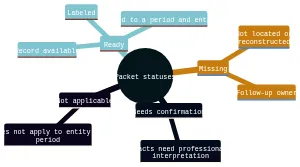
    Status Ready, Missing, Needs confirmation, or Not applicable
    Follow-up owner The person who will locate, explain, upload, or raise the item at the meeting
    Meeting question A short question when a professional determination is needed

    Use a naming pattern that keeps related files together, such as 2026-03_Entity_BankStatement_Ready.pdf. The format is less important than consistency and a source location someone else can find. Keep the index current as files arrive; do not hide a gap by replacing it with an assumption.

    Use statuses to separate evidence, estimates, and questions

    A status is not a tax conclusion. It tells the reviewer what exists, what is absent, and what still needs discussion.

    • Ready: The record is available, labeled, tied to a period and entity, and stored at the listed location. Example: a reconciled ledger plus the related bank statement.
    • Missing: You expect the item to exist, but it has not been located or reconstructed. Name the follow-up owner and a target for locating it.
    • Needs confirmation: The packet contains facts, but a credentialed tax professional must interpret them. Example: “Texas activity began in July; confirm review implications.”
    • Not applicable: The module genuinely does not apply to that entity or period. Add a brief reason, such as “no employees during this period.”

    Create separate rows for documented facts, estimates, and questions. An estimate should identify who prepared it, the period it covers, the inputs used, and why source records are incomplete. Do not place an estimate in the same folder or row as documented payment evidence. Incomplete records may lead preparers to consider estimates, but incomplete records do not assure that an estimate can be used. Keep the missing support visible and ask for professional review.

    A mind map showing four packet statuses: Ready, Missing, Needs confirmation, and Not applicable, with the meaning of each status.
    Use these four statuses to make available records, gaps, and items needing professional review visible.

    Checklist: Gather bookkeeping records and payment evidence

    Begin with the records that explain how your books were built. The IRS says a recordkeeping system may be suited to your business if it clearly shows income and expenses. Electronic records follow the same basic recordkeeping principles as hard-copy records.

    Bookkeeping records

    • Transaction summary from your accounting journals, ledgers, or bookkeeping system.
    • Current profit-and-loss statement, balance sheet, and any account-reconciliation workpapers available for review.
    • Business bank-account statements, with the covered period, entity, and file location recorded.
    • Business credit-card statements and payment-platform summaries.
    • A list of accounts that are not reconciled, with the last completed period and follow-up owner.
    • A short note identifying bookkeeping changes, new software, changed chart-of-account categories, or records maintained outside the usual system.

    For most small businesses, the business checking account is a main source of entries in the books. It is a starting point, not a substitute for keeping the supporting records behind transactions.

    Income and payment evidence

    • Sales summaries, invoices, receipt books, cash-register reports, deposit information, and applicable Forms 1099-MISC.
    • A gross-receipts schedule that identifies the amount and source of receipts by period.
    • Paid bills, invoices, receipts, canceled checks, account statements, and electronic-payment confirmations for purchases and expenses.
    • For each material purchase or expense, support showing the payee, amount, proof of payment, date, and description of the item or service.
    • A list of deposits, transfers, refunds, or charges that cannot yet be matched to the books.

    Organize supporting documents by year and by income or expense type, then link each group to the related index row. One record may not show every detail. Retain the combination of records that documents the transaction rather than relying on a single screenshot or bank-line description.

    Boundary: Label unclear transactions as Needs confirmation. Do not decide whether a transaction has a particular tax treatment from the packet alone.

    Checklist: Add payroll, contractors, assets, and forecasts

    These modules connect current operations to the questions likely to arise in planning. Keep the facts and your projections distinct.

    Payroll and contractor records

    • Payroll registers or summaries by pay period and entity.
    • Payroll tax records and payment evidence available for the period.
    • Employee compensation changes, bonuses, new hires, departures, and benefit changes, labeled as documented facts.
    • Contractor payment records, invoices, agreements available for review, and payment evidence.
    • A list of workers or payments needing classification or reporting confirmation, without assigning a conclusion.

    The IRS states that employment records must be kept for at least four years. Confirm retention needs for your circumstances with the appropriate professional. Treat payroll, contractor, identity, and account information as sensitive.

    Business assets

    • Asset register or list of business assets, including equipment, furniture, vehicles, or other property used in the business.
    • Purchase invoices, payment support, dates placed in service when available, and sale or disposal records.
    • Planned asset purchases, separated from completed purchases and labeled as forecasts.
    • Questions about an asset’s use, ownership, sale, replacement, or related records.

    Keep business-asset records because they are needed to verify information for annual depreciation and gain or loss on sale. The packet should preserve the records; a credentialed tax professional should confirm the relevant treatment.

    Forecasts

    • Revenue forecast, showing the forecast period, preparer, assumptions, and source data.
    • Projected income and major expected expenses, clearly labeled as estimates.
    • Owner compensation plans, payroll expectations, and contractor-payment expectations.
    • Expected state activity, planned locations, and planned purchases.
    • A variance note identifying major differences between current bookkeeping records and the forecast.

    A planning packet can identify the entity, ownership, revenue, projected income, owner compensation, payroll, contractor payments, planned asset purchases, state activity, bookkeeping quality, and prior-year positions for professional review. Record what you know, identify the source, and flag what needs confirmation.

    Checklist: Connect prior-year documents to current business changes

    Prior-year documents provide context. Current business changes explain why a prior-year pattern may no longer describe the business.

    Prior-year documents

    • Prior-year tax returns for the entity and related financial statements available for the review.
    • Prior-year bookkeeping reports and year-end account balances, if available.
    • Prior-year asset schedules and records of asset sales or disposals.
    • Prior-year correspondence, notices, extensions, or unresolved items that the reviewing professional should see.
    • A short list of prior-year positions or questions that remain open, marked Needs confirmation.

    Include prior-year returns and financial statements so the reviewing professional can understand tax history and business financial information. Record the year, entity, source location, and whether the document is complete.

    Current business changes

    Create a separate change log with an effective date, source, status, and owner for each item:

    • Entity formation, conversion, merger, termination, or ownership change.
    • New or closed business locations.
    • New products, services, lines of business, or operating jurisdictions.
    • Material changes in revenue, staffing, payroll, contractors, or owner compensation.
    • New loans, financing, inventory practices, or significant contracts.
    • Planned purchases, sales, or disposals of business assets.
    • Out-of-state customers, employees, contractors, property, or operations.

    Describe the change factually. For example, write “Operations began in another state on [date]” rather than assigning a filing or nexus result. End each uncertain row with a direct question for professional review.

    Checklist: Flag Texas and out-of-state review topics without deciding them

    Add a Texas review module whenever the business was formed in Texas, has Texas activity, has changed entity status, or may have activity outside its formation state. This is a discussion list, not a filing position.

    • Entity name, entity type, formation jurisdiction, and governing-law information.
    • Texas business locations, employees, property, contractors, customers, and operational dates.
    • Out-of-state locations, employees, property, contractors, customers, and operational dates.
    • Dates of formation, registration, conversion, merger, termination, withdrawal, or cessation of activity.
    • Texas franchise tax correspondence, account information, prior reports or information reports available for review.
    • A timeline of when Texas or out-of-state activity began, changed, or ended.
    • Questions about nexus, registration, entity classification, and report requirements, all marked Needs confirmation.

    Texas franchise-tax rules apply to taxable entities formed or organized in Texas or doing business in Texas. Record the entity type and ask a credentialed tax professional to confirm its Texas franchise-tax treatment. For a Texas review, document where the entity was formed and what law governs its internal affairs; do not use the principal office location alone to classify it as domestic or foreign.

    Texas and out-of-state activity should be listed as a nexus and registration review topic. A Texas Nexus Questionnaire may be useful, but it does not provide a definitive registration answer. Texas registration can have tax, legal, and licensing consequences, so it requires appropriate professional review.

    If the business is terminating, converting, or merging, flag the change and dates for current Texas professional review. If an out-of-state entity may be ending Texas nexus, record the cessation date and seek current professional confirmation promptly.

    Prepare sensitive packet files for secure sharing

    Before sharing, identify documents containing payroll details, contractor information, payment-account data, taxpayer identification details, banking information, or other sensitive business records. Keep an orderly packet copy in your own records, with the same file names used in the index.

    Use the secure channel supplied by the reviewing practitioner when one is available, such as a client portal or secure email link. Do not send a collection of unlabeled attachments without the packet index. Upload by module where possible, then mark the corresponding row Ready only after confirming the correct file was shared.

    For every sensitive file, verify the period, entity, source or file location, status, and follow-up owner before sharing. If a document is unavailable, mark it Missing. If its meaning or completeness is uncertain, mark it Needs confirmation rather than editing it to appear complete.

    Turn open items into a focused meeting agenda

    Your final step is to turn every Needs confirmation row into a short meeting question. Keep each question tied to a document, period, entity, and decision point. This lets the meeting focus on the items that require professional judgment instead of searching for files.

    Bring questions such as:

    • “Which missing bookkeeping records should we reconstruct before further review?”
    • “What additional payment evidence would help explain these unmatched transactions?”
    • “How should we document the assumptions behind this forecast?”
    • “Which payroll or contractor records need follow-up?”
    • “What asset records should we locate for this purchase, sale, or planned acquisition?”
    • “What prior-year documents or unresolved items should be considered with current changes?”
    • “Which facts about our Texas activity, entity, locations, or out-of-state operations need further review?”
    • “Who owns each remaining Missing item, and what is the next follow-up step?”

    Review the index once more before the meeting. Confirm that every row has a status and owner, estimates are clearly separated from source records, and sensitive documents are ready for secure sharing. The result is a practical handoff: organized facts, visible gaps, and focused questions for a credentialed tax professional.

    Frequently asked questions about tax-planning review packets

    What should be included in a tax-planning review packet?

    Include bookkeeping records, payment evidence, payroll and contractor records, business assets, forecasts, prior-year documents, and any open business-change or Texas review topics. Keep each item tied to a period, entity, source, status, and follow-up owner.

    How should missing records be handled in the packet?

    Mark them as Missing and keep them visible. Add the period, entity, source location if known, and who is responsible for finding or reconstructing them. Do not fill gaps with assumptions.

    How should estimates be labeled alongside source records?

    Keep estimates separate from documented facts. Note who prepared the estimate, what period it covers, what inputs were used, and why the underlying records are incomplete. Flag it for professional review.

    What Texas items should be flagged for review?

    Record Texas formation, entity type, business activity, locations, and any out-of-state activity. Also flag nexus, registration, entity changes, termination, merger, or withdrawal questions for confirmation.

    How detailed should payment and expense support be?

    For each material transaction, keep support that shows the payee, amount, proof of payment, date, and what was purchased or received. One document may not cover everything, so keep the full set that explains the transaction.

    What prior-year materials are most useful to include?

    Prior-year returns, financial statements, year-end balances, asset schedules, and unresolved prior-year questions are helpful. They give the reviewing professional context for your current records and changes.

    How should sensitive files be shared for review?

    Use the secure portal or secure email link provided by the reviewing professional when available. Keep file names consistent with the packet index, and confirm the correct document, period, and entity before uploading.

  • Tax-Planning Meeting Packet: A Record Triage Guide

    Tax-Planning Meeting Packet: A Record Triage Guide

    Start with a record triage board

    Before gathering files, create a record triage board. Its purpose is to show a credentialed tax professional what is documented, what is incomplete, and what needs discussion. It does not decide deductions, tax liability, eligibility, filing obligations, or other tax positions.

    Use the board to identify the entity, period, source, status, and owner for every record group. Create separate groups for bookkeeping records, payroll and contractor records, business assets, and prior-year documents.
    The IRS says a business may use a recordkeeping system suited to its operations if it clearly shows income and expenses. Purchases, sales, payroll, and other transactions generate supporting documents, which support entries in business books and on a tax return. Your packet should make the connection between the summary and its available support easy to inspect.

    Begin with an index rather than a document pile. List each record group and its status. Leave an unavailable item visible. Record who will locate it and what question remains if it cannot be found.

    A recordkeeping system may be suited to the business if it clearly shows income and expenses; supporting documents support business-book entries and tax-return entries.

    Build an item card for each record or issue

    Treat each document, estimate, or question as an item card in your index. The card gives the reviewer enough context to locate the underlying file without opening every folder. Consistent file names and folders organized by year and document type support this approach.

    Item-card field Record Example
    Item Plain-language description August operating account statement
    Entity Business connected to the item ABC Services LLC
    Period Date range covered Aug. 2026
    Source Original location or file path Bank portal / 2026 / Cash activity
    Status Ready, Missing, Needs confirmation, or Not applicable Ready
    Owner Person taking the next step Owner

    A file name such as ABC-Services-LLC_2026-08_Operating-Account_Ready.pdf can mirror the card. Apply the same pattern to reports, invoices, payroll files, asset support, and prior-year materials.

    Use Ready only when the item is available and connected to the right entity and period. Use Missing when you expect support but cannot locate it. Use Needs confirmation for an estimate, incomplete information, or a professional-review question. Use Not applicable only with a brief reason. These labels describe the state of the material; they do not confirm tax treatment.

    Mind map showing the six fields used to label every tax-planning review packet item: item name, entity, period, source or file location, status, and follow-up owner. Status options are Ready, Missing, Needs confirmation, and Not applicable.
    Use the same six-field label to make every packet item searchable and review-ready.

    Route records, projections, and questions separately

    Use three routes on the triage board: evidence, planning inputs, and questions. Keeping them apart prevents an assumption from being mistaken for a completed transaction.

    Evidence is a source record or completed report, such as a bank statement, invoice, paid bill, deposit record, payroll report, receipt, canceled check, contract, or asset invoice. For purchases and expenses, the IRS describes records that identify the payee, amount, proof of payment, date, and the item or service. One document may not show every detail, so connect related records rather than treating a partial record as complete.

    Planning inputs include forecasts and estimates. Keep them in a separate worksheet that identifies the entity, period, preparation date, source, assumptions, and preparer. A projection based on signed work and a projection based on a sales pipeline may both be useful, but each should retain its own description and Needs confirmation status.

    Questions belong in a short decision log. For each one, state the known facts, linked files, missing support, and the specific matter to confirm.

    Material Route Status
    Completed source record Relevant evidence folder Ready
    Projection with assumptions Forecast worksheet Needs confirmation
    Expected but unlocated support Relevant folder and decision log Missing
    Irrelevant category Index with reason Not applicable

    This routing system helps the professional conversation begin with the actual gap instead of reconstructing it from mixed notes.

    Test the bookkeeping trail against payment support

    Use the transaction summary as the starting point for an evidence check. The IRS describes a transaction summary as part of a business recordkeeping system, commonly maintained in accounting journals or ledgers. Export the available reports for the review period, identify the entity, and note which accounts remain unreconciled.

    Create a short support map beside the reports. It can include:

    • Profit and loss statement, balance sheet, and general ledger.
    • Operating-account and card statements connected to business activity.
    • Reconciliations, plus a list of accounts still requiring work.
    • Sales summaries, invoices, deposit information, receipt books, or cash-register records.
    • Unusual, uncategorized, split, large, or personal transactions that need discussion.

    Then test material ledger lines against available support. The IRS recommends organizing supporting documents by year and income or expense type. For gross receipts, retain documents showing the amount and source. For purchases and expenses, gather available payee, amount, payment proof, date, and item or service information.

    Where one record lacks context, link it to another. Pair an invoice with a statement or transfer record when payment evidence is separate. Pair a payment record with a receipt, invoice, or vendor note when its purpose is unclear. Preserve the source documents and flag unresolved facts for review rather than assigning them a tax result.

    Create exception lists for compensation and assets

    Build two exception lists: one for compensation records and one for property records. This makes gaps visible without requiring you to classify a payment or calculate a tax outcome.

    For the compensation list, collect available payroll registers, provider reports, payment support, contractor invoices, agreements, payment summaries, and year-end materials. Mark files where the entity, period, description, or related bookkeeping entry does not match. Keep payroll and contractor materials separately labeled even when they relate to the same period.

    The IRS states that employment tax records should be kept for at least four years after the tax becomes due or is paid, whichever is later. Put retention questions on the decision log rather than applying a general timeline to a specific situation without review.

    For the property list, create one item card per business asset, such as equipment, furniture, vehicles, machinery, or other business property. The IRS says asset records are needed to compute annual depreciation and gain or loss on disposition. Gather available records for:

    • Description, entity owner, and business use.
    • Acquisition date, method, purchase price, and improvement costs.
    • Available deduction or depreciation history.
    • Sale, trade-in, retirement, damage, or other disposition details.
    • Invoices, closing statements, and payment support.

    Generally, retain property records until the limitation period expires for the year of disposition. If an asset changed use or left the business, attach the available facts and mark the item for professional review.

    Compare current plans with prior-year context

    Use a comparison page to connect current plans to earlier records and dated changes. Divide it into three panels: forward-looking inputs, prior-year reference, and change events.

    In the forward-looking panel, list available projections for revenue, owner compensation, payroll, contractor payments, planned asset purchases, and state activity. A tax-planning workflow may gather entity, ownership, revenue, projections, compensation, payroll, contractor, asset, state-activity, bookkeeping, and prior-year-position information. For each projection, name its source and assumptions. State whether it is based on a signed agreement, budget, sales pipeline, or informal estimate.

    In the prior-year panel, include filed tax returns, financial statements, bookkeeping reports, and available carryforward details or notes. The IRS notes that copies of filed tax returns can help with future returns and amended-return computations. These documents provide context; they do not establish the right treatment for the current period.

    In the change-events panel, make a dated timeline for:

    • Entity formation, conversion, merger, termination, or ownership changes.
    • Compensation changes or new owners.
    • New, closed, remote, or out-of-state locations and operations.
    • Major contracts, payment channels, or operational changes.
    • Purchases, sales, or changes in use of business property.

    Attach the available source document and one review question to each event. For example: “Conversion completed in May; confirm which current-period records and review topics are relevant.”

    Make a state-activity fact sheet

    Create a state-activity fact sheet when business activity extends beyond one state or raises Texas questions. Record facts first: where the entity is formed, where work occurs, where people and property are located, and when activity began, changed, or ended. Do not use the sheet to decide nexus, registration, franchise-tax status, or filing obligations.

    The Texas Comptroller describes Texas franchise tax as a privilege tax imposed on each taxable entity formed or organized in Texas or doing business in Texas. Texas Secretary of State guidance says a foreign entity’s registration need depends on the nature and extent of its Texas activities. Documenting the activity creates a clearer basis for entity-specific confirmation.

    Include, when available:

    • Formation documents and current entity details.
    • Texas and out-of-state locations, projects, inventory, employees, and contractors.
    • Dates for activity in each state.
    • Ownership, conversion, merger, termination, or withdrawal records.
    • Prior Texas filings, notices, or correspondence.
    • Open questions about franchise tax, nexus, registration, or other state activity.

    For reports due in 2024 and later under Texas Comptroller guidance, entities at or below the no-tax-due threshold may still need to file an annual information report. Confirm current requirements and entity-specific obligations before acting.

    Ask the credentialed tax professional: Which Texas franchise-tax topics need review? Do the documented locations, personnel, contractors, inventory, or activities raise a nexus question? Does another state require a separate review? Did an entity or ownership change create a current-period follow-up? Which facts or files are still needed?

    For each state-activity entry, use a compact row: activity or change, entity, location, start and end date if known, source, status, and question owner. For example, record a new project location as a documented fact, attach the available agreement or internal record, and keep any registration or nexus question separate. This format lets the reviewer distinguish an ongoing activity from a historical change and see whether the date or source still needs confirmation. If you do not know when activity began or ended, leave that field visible as Missing rather than estimating a date.

    Hand off an indexed set of open decisions

    The final handoff is an index, not a claim that every matter is resolved. Before sharing it, scan the item cards and decision log for missing fields, duplicate files, and unclear owners.

    Use this final check:

    • Verify every item identifies an entity, period, source, status, and follow-up owner.
    • Check that transaction summaries have linked support or a visible gap.
    • Keep projections separate from completed records and retain their assumptions.
    • Confirm each Missing item has a next step and responsible person.
    • Review the change-events timeline and state-activity fact sheet for supporting files.
    • Share sensitive bank, payroll, payment, and identity information only through an appropriate secure method.
    • Restrict access to sensitive tax documents with strong passwords and multifactor authentication where available.
    • Keep electronic files organized under the same basic recordkeeping principles that apply to hard-copy records.
    • Preserve records supporting reported income, deductions, or credits until the applicable limitation period expires, and ask the reviewing professional about retention questions affecting your circumstances.

    Packet-preparation guidance can organize, label, flag, and prepare materials for secure professional review. It does not determine deductions, liability, eligibility, filing obligations, entity status, Texas nexus, or another tax position.

    A useful meeting packet makes the evidence trail, unavailable support, forecasts, changes, and unanswered questions visible at the same time.

    Tax-planning review packet FAQ

    What should be in a meeting-ready tax-planning review packet?

    Keep each item tied to a period, source, status, and follow-up owner.

    How should I label items in the packet?

    Use one consistent label for every item: item name, entity, period, source or file location, status, and follow-up owner. That makes it easier to see what is ready, missing, or still needs confirmation.

    How do I separate estimates from documented records?

    Put source documents in the applicable records module and keep forecasts in a separate forecasts section with their assumptions noted. If a figure is only projected or incomplete, mark it as needs confirmation rather than treating it like a completed transaction.

    What Texas topics belong in the review packet?

    Use the Texas section for entity facts, locations, ownership changes, new or closed activity, and any questions about franchise tax, nexus, registration, or out-of-state operations. Treat these as review topics and confirm the filing position with a credentialed tax professional.

    How should I share the packet securely?

    Share it through an appropriate secure method and limit access to sensitive banking, payroll, payment, and identity information. Keep digital files organized and protected with strong passwords and multifactor authentication where available.