
Category: Tax Packet Preparation

  • Tax-Planning Meeting Packet: A Record Triage Guide

    Tax-Planning Meeting Packet: A Record Triage Guide

    Start with a record triage board

    Before gathering files, create a record triage board. Its purpose is to show a credentialed tax professional what is documented, what is incomplete, and what needs discussion. It does not decide deductions, tax liability, eligibility, filing obligations, or other tax positions.

    Use the board to identify the entity, period, source, status, and owner for every record group. Create separate groups for bookkeeping records, payroll and contractor records, business assets, and prior-year documents.
    The IRS says a business may use a recordkeeping system suited to its operations if it clearly shows income and expenses. Purchases, sales, payroll, and other transactions generate supporting documents, which support entries in business books and on a tax return. Your packet should make the connection between the summary and its available support easy to inspect.

    Begin with an index rather than a document pile. List each record group and its status. Leave an unavailable item visible. Record who will locate it and what question remains if it cannot be found.

    A recordkeeping system may be suited to the business if it clearly shows income and expenses; supporting documents support business-book entries and tax-return entries.

    Build an item card for each record or issue

    Treat each document, estimate, or question as an item card in your index. The card gives the reviewer enough context to locate the underlying file without opening every folder. Consistent file names and folders organized by year and document type support this approach.

    Item-card field Record Example
    Item Plain-language description August operating account statement
    Entity Business connected to the item ABC Services LLC
    Period Date range covered Aug. 2026
    Source Original location or file path Bank portal / 2026 / Cash activity
    Status Ready, Missing, Needs confirmation, or Not applicable Ready
    Owner Person taking the next step Owner

    A file name such as ABC-Services-LLC_2026-08_Operating-Account_Ready.pdf can mirror the card. Apply the same pattern to reports, invoices, payroll files, asset support, and prior-year materials.

    Use Ready only when the item is available and connected to the right entity and period. Use Missing when you expect support but cannot locate it. Use Needs confirmation for an estimate, incomplete information, or a professional-review question. Use Not applicable only with a brief reason. These labels describe the state of the material; they do not confirm tax treatment.
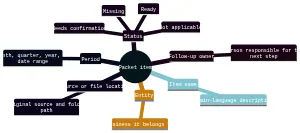
    Mind map showing the six fields used to label every tax-planning review packet item: item name, entity, period, source or file location, status, and follow-up owner. Status options are Ready, Missing, Needs confirmation, and Not applicable.
    Use the same six-field label to make every packet item searchable and review-ready.

    Route records, projections, and questions separately

    Use three routes on the triage board: evidence, planning inputs, and questions. Keeping them apart prevents an assumption from being mistaken for a completed transaction.

    Evidence is a source record or completed report, such as a bank statement, invoice, paid bill, deposit record, payroll report, receipt, canceled check, contract, or asset invoice. For purchases and expenses, the IRS describes records that identify the payee, amount, proof of payment, date, and the item or service. One document may not show every detail, so connect related records rather than treating a partial record as complete.

    Planning inputs include forecasts and estimates. Keep them in a separate worksheet that identifies the entity, period, preparation date, source, assumptions, and preparer. A projection based on signed work and a projection based on a sales pipeline may both be useful, but each should retain its own description and Needs confirmation status.

    Questions belong in a short decision log. For each one, state the known facts, linked files, missing support, and the specific matter to confirm.

    Material Route Status
    Completed source record Relevant evidence folder Ready
    Projection with assumptions Forecast worksheet Needs confirmation
    Expected but unlocated support Relevant folder and decision log Missing
    Irrelevant category Index with reason Not applicable

    This routing system helps the professional conversation begin with the actual gap instead of reconstructing it from mixed notes.

    Test the bookkeeping trail against payment support

    Use the transaction summary as the starting point for an evidence check. The IRS describes a transaction summary as part of a business recordkeeping system, commonly maintained in accounting journals or ledgers. Export the available reports for the review period, identify the entity, and note which accounts remain unreconciled.

    Create a short support map beside the reports. It can include:

    • Profit and loss statement, balance sheet, and general ledger.
    • Operating-account and card statements connected to business activity.
    • Reconciliations, plus a list of accounts still requiring work.
    • Sales summaries, invoices, deposit information, receipt books, or cash-register records.
    • Unusual, uncategorized, split, large, or personal transactions that need discussion.

    Then test material ledger lines against available support. The IRS recommends organizing supporting documents by year and income or expense type. For gross receipts, retain documents showing the amount and source. For purchases and expenses, gather available payee, amount, payment proof, date, and item or service information.

    Where one record lacks context, link it to another. Pair an invoice with a statement or transfer record when payment evidence is separate. Pair a payment record with a receipt, invoice, or vendor note when its purpose is unclear. Preserve the source documents and flag unresolved facts for review rather than assigning them a tax result.

    Create exception lists for compensation and assets

    Build two exception lists: one for compensation records and one for property records. This makes gaps visible without requiring you to classify a payment or calculate a tax outcome.

    For the compensation list, collect available payroll registers, provider reports, payment support, contractor invoices, agreements, payment summaries, and year-end materials. Mark files where the entity, period, description, or related bookkeeping entry does not match. Keep payroll and contractor materials separately labeled even when they relate to the same period.

    The IRS states that employment tax records should be kept for at least four years after the tax becomes due or is paid, whichever is later. Put retention questions on the decision log rather than applying a general timeline to a specific situation without review.

    For the property list, create one item card per business asset, such as equipment, furniture, vehicles, machinery, or other business property. The IRS says asset records are needed to compute annual depreciation and gain or loss on disposition. Gather available records for:

    • Description, entity owner, and business use.
    • Acquisition date, method, purchase price, and improvement costs.
    • Available deduction or depreciation history.
    • Sale, trade-in, retirement, damage, or other disposition details.
    • Invoices, closing statements, and payment support.

    Generally, retain property records until the limitation period expires for the year of disposition. If an asset changed use or left the business, attach the available facts and mark the item for professional review.

    Compare current plans with prior-year context

    Use a comparison page to connect current plans to earlier records and dated changes. Divide it into three panels: forward-looking inputs, prior-year reference, and change events.

    In the forward-looking panel, list available projections for revenue, owner compensation, payroll, contractor payments, planned asset purchases, and state activity. A tax-planning workflow may gather entity, ownership, revenue, projections, compensation, payroll, contractor, asset, state-activity, bookkeeping, and prior-year-position information. For each projection, name its source and assumptions. State whether it is based on a signed agreement, budget, sales pipeline, or informal estimate.

    In the prior-year panel, include filed tax returns, financial statements, bookkeeping reports, and available carryforward details or notes. The IRS notes that copies of filed tax returns can help with future returns and amended-return computations. These documents provide context; they do not establish the right treatment for the current period.

    In the change-events panel, make a dated timeline for:

    • Entity formation, conversion, merger, termination, or ownership changes.
    • Compensation changes or new owners.
    • New, closed, remote, or out-of-state locations and operations.
    • Major contracts, payment channels, or operational changes.
    • Purchases, sales, or changes in use of business property.

    Attach the available source document and one review question to each event. For example: “Conversion completed in May; confirm which current-period records and review topics are relevant.”

    Make a state-activity fact sheet

    Create a state-activity fact sheet when business activity extends beyond one state or raises Texas questions. Record facts first: where the entity is formed, where work occurs, where people and property are located, and when activity began, changed, or ended. Do not use the sheet to decide nexus, registration, franchise-tax status, or filing obligations.

    The Texas Comptroller describes Texas franchise tax as a privilege tax imposed on each taxable entity formed or organized in Texas or doing business in Texas. Texas Secretary of State guidance says a foreign entity’s registration need depends on the nature and extent of its Texas activities. Documenting the activity creates a clearer basis for entity-specific confirmation.

    Include, when available:

    • Formation documents and current entity details.
    • Texas and out-of-state locations, projects, inventory, employees, and contractors.
    • Dates for activity in each state.
    • Ownership, conversion, merger, termination, or withdrawal records.
    • Prior Texas filings, notices, or correspondence.
    • Open questions about franchise tax, nexus, registration, or other state activity.

    For reports due in 2024 and later under Texas Comptroller guidance, entities at or below the no-tax-due threshold may still need to file an annual information report. Confirm current requirements and entity-specific obligations before acting.

    Ask the credentialed tax professional: Which Texas franchise-tax topics need review? Do the documented locations, personnel, contractors, inventory, or activities raise a nexus question? Does another state require a separate review? Did an entity or ownership change create a current-period follow-up? Which facts or files are still needed?

    For each state-activity entry, use a compact row: activity or change, entity, location, start and end date if known, source, status, and question owner. For example, record a new project location as a documented fact, attach the available agreement or internal record, and keep any registration or nexus question separate. This format lets the reviewer distinguish an ongoing activity from a historical change and see whether the date or source still needs confirmation. If you do not know when activity began or ended, leave that field visible as Missing rather than estimating a date.

    Hand off an indexed set of open decisions

    The final handoff is an index, not a claim that every matter is resolved. Before sharing it, scan the item cards and decision log for missing fields, duplicate files, and unclear owners.

    Use this final check:

    • Verify every item identifies an entity, period, source, status, and follow-up owner.
    • Check that transaction summaries have linked support or a visible gap.
    • Keep projections separate from completed records and retain their assumptions.
    • Confirm each Missing item has a next step and responsible person.
    • Review the change-events timeline and state-activity fact sheet for supporting files.
    • Share sensitive bank, payroll, payment, and identity information only through an appropriate secure method.
    • Restrict access to sensitive tax documents with strong passwords and multifactor authentication where available.
    • Keep electronic files organized under the same basic recordkeeping principles that apply to hard-copy records.
    • Preserve records supporting reported income, deductions, or credits until the applicable limitation period expires, and ask the reviewing professional about retention questions affecting your circumstances.

    Packet-preparation guidance can organize, label, flag, and prepare materials for secure professional review. It does not determine deductions, liability, eligibility, filing obligations, entity status, Texas nexus, or another tax position.

    A useful meeting packet makes the evidence trail, unavailable support, forecasts, changes, and unanswered questions visible at the same time.

    Tax-planning review packet FAQ

    What should be in a meeting-ready tax-planning review packet?

    Keep each item tied to a period, source, status, and follow-up owner.

    How should I label items in the packet?

    Use one consistent label for every item: item name, entity, period, source or file location, status, and follow-up owner. That makes it easier to see what is ready, missing, or still needs confirmation.

    How do I separate estimates from documented records?

    Put source documents in the applicable records module and keep forecasts in a separate forecasts section with their assumptions noted. If a figure is only projected or incomplete, mark it as needs confirmation rather than treating it like a completed transaction.

    What Texas topics belong in the review packet?

    Use the Texas section for entity facts, locations, ownership changes, new or closed activity, and any questions about franchise tax, nexus, registration, or out-of-state operations. Treat these as review topics and confirm the filing position with a credentialed tax professional.

    How should I share the packet securely?

    Share it through an appropriate secure method and limit access to sensitive banking, payroll, payment, and identity information. Keep digital files organized and protected with strong passwords and multifactor authentication where available.


  • Turn Tax-Planning Exceptions Into Review Briefs for Austin Businesses

    Turn Tax-Planning Exceptions Into Review Briefs for Austin Businesses

    Start with what needs explanation

    A tax-planning packet can begin with the records that need explanation rather than with a complete inventory of files. An exception may be an unexplained bookkeeping balance, a source record that does not match a summary, a missing document, a planning assumption, or a business fact that requires professional judgment.

    Turn each material exception into a short review brief. The brief identifies the period and entity, preserves the available records, states the break in the evidence trail, and asks one focused question. This approach keeps current bookkeeping, payment activity, payroll information, asset events, forecasts, and Texas or federal concerns attached to the business item that prompted review.

    The IRS says a business may use a recordkeeping system suited to the business if it clearly shows income and expenses, and the records needed for federal tax purposes can vary with the business. A review-brief format uses that flexibility to make the meeting agenda visible without assuming that every business needs the same file set.

    The briefs organize facts and unresolved matters for review. They do not determine deductions, filing obligations, taxability, worker status, or deadlines.

    Sort exceptions before assembling the packet

    Sort the work by the kind of exception before collecting supporting files. This creates a meeting agenda from the business items that need attention instead of a general document-gathering exercise.

    1. Name the exception. Identify whether the issue is an unexplained total, incomplete support, a mismatch between records, a future scenario, or a rule-dependent question.

    2. Set the factual boundary. Record the entity, period, business activity, and bookkeeping reference. Keep known facts separate from information supplied by recollection or projection.

    3. Attach the available trail. Link the item to statements, invoices, receipts, payment confirmations, reports, agreements, or other records already available.

    4. Describe the break. State exactly what is missing, inconsistent, estimated, or still unknown. Do not supply a tax answer to make the brief appear complete.

    5. Assign the next factual step. Identify who can locate a record, explain an entry, confirm an event, or provide further details.

    6. Frame one review question. Ask what must be verified, evaluated, or discussed by the credentialed professional.

    Prioritize briefs where missing evidence, a material discrepancy, a planned transaction, or a time-sensitive dependency could affect the discussion. The result is a set of discrete review paths, each moving from a business item to its evidence and then to its unresolved question.

    Use one brief for one unresolved business item

    Use an exception-brief register as the meeting cover sheet. Each row should represent one unresolved business item, not one folder or every document in the packet. A short register lets the reviewer see why a record matters before opening it.

    Give each brief these fields:

    • Exception type: unexplained amount, missing support, record mismatch, planning scenario, or judgment question.
    • Business item: the balance, transaction group, activity, or forecast that triggered the brief.
    • Period and entity: the relevant dates and entity, business line, or operating unit.
    • Bookkeeping context: the account, report, transaction detail, or other summary where the item appears.
    • Available source trail: attached or missing statements, invoices, receipts, payment detail, reports, or other support.
    • Evidence position: confirmed by source document, estimate or assumption, needs documentation, or open question for credentialed professional review.
    • Factual owner and next step: the person who can supply a record or clarify the underlying event.
    • Review question: the single matter requiring discussion.

    Organize supporting documents in an orderly fashion, such as by year and type of income or expense. The register is not a substitute for those records; it is a map of the exceptions they need to address.

    Separate evidence gaps from judgment questions

    Use two distinct labels in every brief: an evidence position and an exception type. The evidence position tells the reviewer what support exists. The exception type tells the reviewer why the item needs attention. Neither label makes a tax conclusion.

    Evidence positions

    • Confirmed by source document: Available records connect the item to the relevant transaction, period, and entity.
    • Estimate or assumption: The amount or fact comes from a projection, allocation, recollection, or preliminary calculation. State its basis.
    • Needs documentation: The activity is known, but supporting material needed to explain it is unavailable.
    • Open question for credentialed professional review: The facts available do not resolve a classification, filing, treatment, or other judgment-dependent issue.

    An item can have more than one issue without changing its evidence position. For example, a documented planned purchase can remain an estimate or assumption because the event has not occurred; a known payment can need documentation because its invoice is absent.

    Do not use an estimate to fill a missing record or combine either with a documented amount. Some circumstances may also be subject to specific documentation rules.

    For any brief that is not confirmed, identify the available support, missing fact, factual owner, and the question that remains.

    Brief unexplained income and expense differences

    Create financial exception briefs only for totals or transaction groups that need an explanation. Rather than repeating the full profit-and-loss statement in the packet, use it to identify material changes, unsupported balances, unusual activity, or differences between bookkeeping and available records.

    IRS guidance says business books must show gross income, deductions, and credits, and that supporting documents from purchases, sales, payroll, and other transactions support entries in books and on tax returns.

    For an income or expense brief, attach the relevant:

    • General-ledger detail and the current-year summary where the item appears.
    • Bank, credit-card, payment-platform, or merchant-processor activity tied to the item.
    • Sales reports, invoices, receipt books, deposit information, or other records showing gross-receipt amounts and sources.
    • Vendor bills, purchase invoices, receipts, account statements, and proof-of-payment records.
    • A short note identifying the unexplained difference, unavailable support, or factual question.

    For gross receipts, IRS guidance calls for supporting documents showing amounts and sources. For purchases and expenses, it identifies payee, amount, proof of payment, date, and a business-purpose description as key details. More than one supporting document may be needed to substantiate all elements of a purchase or expense.

    If the available trail does not explain the item, leave the brief open and state what evidence or factual clarification is needed.

    Brief payment, payroll, and contractor exceptions

    Use separate exception categories for payments, payroll, and contractor activity because each category creates different factual questions. Do not create a category merely because records exist; create a brief when the item needs explanation, support, or professional review.

    Payment exception brief: Identify the unexplained payment, duplicate-looking transaction, amount difference, or absent support. Attach account activity, an invoice, paid bill, check image, electronic-payment confirmation, card statement, payee, and business-purpose detail where available. Mark missing source material as needs documentation.

    Payroll or compensation exception brief: Identify the compensation change, payroll-to-bookkeeping difference, benefit or reimbursement item, or other issue. Attach payroll summaries, provider reports, payment confirmations, and the relevant bookkeeping detail. Preserve the period and entity. IRS guidance states that employment records must be kept for at least four years; confirm current retention requirements for the circumstances with a credentialed professional.

    Contractor exception brief: Attach invoices, agreements or scopes of work if relevant, payment detail, and information already maintained for reporting purposes. The IRS states that worker classification as an employee or independent contractor depends on the facts in each case. Record the available facts, the missing facts, and the question for review rather than assigning a status to the worker.

    Rank these briefs by the importance of the record break or the judgment required, not by the number of documents attached.

    Brief completed asset events and future changes separately

    Use different brief types for an event that has occurred and a change that is only being considered. This prevents historical source records from being confused with planning assumptions.

    A completed asset-event brief can address an acquisition, sale, retirement, trade, damage, or other change. Record the entity, event date, known business use, bookkeeping reference, purchase documents, invoices, payment support, sale records, and any facts still unavailable. The IRS says asset records are needed to calculate annual depreciation and gain or loss upon sale. If a fact is absent, identify the gap rather than assigning treatment.

    A planning-change brief can address expected revenue, anticipated expenses, planned hiring or compensation changes, contemplated purchases or disposals, financing changes, expansion, multistate activity, or another expected transaction. Record the expected period, entity, basis, owner, and the review question.

    The distinction is practical: a completed event asks whether the existing records explain what happened; a planning change asks whether the forecast assumptions and business facts are sufficiently clear for discussion. Keep a planning item labeled estimate or assumption until its factual basis changes, and leave its tax effect open for credentialed professional review.

    Create an agenda for federal and Texas dependencies

    Use the final register as a dependency agenda: questions that cannot be resolved by locating another business record. For each one, identify the entity, period, source records, evidence position, and exact fact requiring verification. This keeps general tax background from becoming an answer for a specific business.

    Federal dependency prompts

    • Which worker-status or payment facts remain unclear after reviewing payroll and contractor records?
    • Which material transactions still lack complete payment, invoice, or business-purpose support?
    • Which ownership, entity, financing, asset, location, or planned-transaction facts require professional evaluation?
    • Which estimates, allocations, reimbursements, or personal-business mixes need a stated basis or more documentation?

    Texas dependency prompts

    • Does the entity’s formation, organization, or business activity require a franchise-tax status review? The Texas Comptroller describes franchise tax as a privilege tax imposed on taxable entities formed or organized in Texas or doing business in Texas.
    • Does the applicable report year raise a franchise-tax or no-tax-due question? For reports originally due on or after January 1, 2024, the Comptroller says an entity at or below the no-tax-due threshold is no longer required to file a No Tax Due Report. This does not determine the entity’s status or whether another report is required.
    • Does business activity require a sales-and-use-tax applicability review? The Comptroller states a 6.25% state rate, with local taxes of up to 2% and a maximum combined rate of 8.25%, for covered transactions; that does not establish whether a particular transaction is taxable.
    • What filing frequency has been assigned, and are current reporting dates verified? Comptroller guidance lists different due dates for quarterly, monthly, and yearly filers.

    The Comptroller states that annual franchise-tax reports are due May 15, moving to the next business day when May 15 is a weekend or holiday. Verify the applicable report year, entity status, filing frequency, taxability, and current deadlines before relying on any date or requirement.

    Hand off a prioritized set of review briefs

    Before the meeting, inspect the reconciliation ledger from priority items to lower-priority items. Each row should show the period, entity, bookkeeping reference, source trail, evidence position, unresolved point, review question, and owner. Confirmed rows provide context; estimates state their basis; missing records identify the gap; and judgment-dependent matters remain open.

    Electronic and paper records can both support this process. The same basic recordkeeping requirements apply to electronic and hard-copy business records, and the IRS says an electronic system must provide a complete, accurate record accessible to the IRS. Keep records as long as needed to prove income or deductions on a tax return, and verify current retention requirements where they apply.

    The completed ledger does not decide tax treatment, filing obligations, deadlines, or legal conclusions. It gives the reviewer a direct route from each selected business item to the evidence and facts that still need discussion.


    Tax packet preparation FAQ

    What should be in a review-ready tax packet for a small business?

    Include the bookkeeping summary, the source records behind key totals, payment records, payroll and contractor information, asset activity, forecasts, and a short list of federal or Texas questions that still need review.

    How should I separate confirmed records from estimates and missing documentation?

    Use clear labels. Mark items as confirmed by source document, estimate or assumption, needs documentation, or open question so the reviewer can see what is solid and what still needs support.

    How should payroll and contractor records be organized?

    Keep payroll reports, payment confirmations, compensation changes, and any related employment records in one module, and keep contractor invoices, agreements, and payment detail in a separate one. If worker status is unclear, flag it as a question rather than deciding it in the packet.

    What belongs in the asset and forecast sections?

    Put historical asset purchases, sales, retirements, and related support in the asset section. Put planned purchases, expected revenue, hiring changes, and other future assumptions in the forecast section, and label those items as estimates.

    What Texas issues should be flagged for professional review?

    Flag franchise-tax status, sales-and-use-tax applicability, filing frequency, and any entity or location changes that may affect Texas treatment. Those questions should stay open until current rules are verified for the business and period.


  • Tax Packet Preparation: A Checklist for Your Austin Tax-Planning Meeting

    Tax Packet Preparation: A Checklist for Your Austin Tax-Planning Meeting

    Build a review packet, not a document pile

    A tax-planning meeting is more useful when the information arrives as a review packet rather than a folder of unconnected files. The goal is not to decide tax treatment yourself or to assemble a return. It is to give a credentialed professional a clear view of the business period, the records behind the numbers, the estimates being used for planning, and the questions that still need an answer.

    Start with one packet for the meeting period and one simple rule: every item should be easy to find, easy to classify, and honest about its level of support. Good records are needed to prepare a return and support reported income, expenses, and credits. That is why an organized packet matters even at the planning stage: it keeps documented information distinct from forecasts, incomplete records, and rule-dependent decisions.

    Your packet should answer six practical questions for each item:

    • What period does this cover?
    • Which business entity does it belong to?
    • What is the document or input?
    • Where is the underlying source located?
    • What is its current status?
    • Who owns the next question or follow-up?

    This approach prevents a common meeting problem: a number appears in a report, but nobody can tell whether it came from a reconciled transaction, an unverified spreadsheet entry, a forecast, or a missing document. A packet does not make an uncertain item certain. It makes the uncertainty visible and ready for review.

    Use the checklist below to gather records across bookkeeping, payments, payroll, assets, forecasts, prior-year materials, Texas matters, and open questions. Keep it focused on preparation. Questions about current filing requirements, deadlines, entity treatment, deductions, or tax liability belong with a credentialed tax professional.

    Use this checklist to gather each packet module

    Create a top-level folder or binder for the meeting, then add the modules below. A digital packet, a paper packet, or a combination can work; the important point is that the contents are organized and indexed.

    1. Current bookkeeping and source records

    Include the current-period profit and loss report, balance sheet, cash-flow information if available, general ledger or transaction summary, and bank and credit-card activity used to prepare the books. Add the underlying records needed to explain material entries: invoices, receipts, sales reports, deposit information, paid bills, and payment confirmations. Purchases, sales, payroll, and other transactions can all generate supporting documents.

    2. Income and payment evidence

    Gather customer invoices, sales summaries, deposit records, merchant-processor reports, payment-platform reports, and other records that explain business receipts. Add a list or export of payments made during the period, including any payments you believe may relate to estimated taxes. Do not label a payment as satisfying a particular obligation unless that treatment has been confirmed.

    3. Payroll and contractor materials

    Include payroll registers, payroll provider reports, wage and withholding summaries, employer payment confirmations, and any available contractor payment records. If an item is not available, list it as missing rather than trying to fill the gap from memory. Keep contractor questions separate from employee payroll questions when you can, and bring any classification or reporting uncertainty to the meeting.

    4. Asset activity

    List equipment, furniture, technology, vehicles, or other business property acquired, improved, sold, traded, or removed from service during the period. Attach available invoices, financing documents, sale records, and descriptions of business use. The point is to identify activity for review, not to decide how it should be treated.

    5. Forecasts and planning inputs

    Add your current revenue outlook, anticipated major expenses, hiring plans, owner-compensation expectations, expected purchases, and cash needs. Put these in a clearly separate forecast section. A projection can be useful for planning, but it is not source evidence.

    6. Prior-year materials

    Include the prior-year return if available, prior-year financial statements, and any prior-year issue list or correspondence you want the professional to understand. A copy of the prior-year return can help an accountant become familiar with the business’s financial health. Prior-year documentation can also help a tax professional understand financial history and spot recurring tax-related issues.

    7. Texas matters and business changes

    Create a short section for entity changes, ownership changes, new locations, out-of-state activity, mergers, conversions, planned termination, or changes in where the business operates. Include formation or transaction documents that relate to those events. These records create a focused basis for questions about Texas applicability and reporting.

    8. Open questions

    Reserve a final page for questions that cannot be answered from the records. Write the question, identify the affected period and entity, name the related documents, and state who can provide more information. This is the part of the packet that turns uncertainty into an efficient meeting agenda.

    Pair bookkeeping summaries with receipts and transaction support

    A summary report is the map; supporting records are the trail behind it. Bring both. The IRS says a business may use a recordkeeping system suited to its needs if it clearly shows income and expenses, and that the system should include a summary of business transactions in books such as accounting journals and ledgers. For many small businesses, the business checking account is a major source for book entries, but a bank feed alone may not explain the business purpose of a transaction.

    For each bookkeeping report, identify the period, entity, report date, and whether the books have been reconciled or are still in progress. Then organize support by year and by income or expense type. The IRS advises keeping supporting documents orderly and safe because they support book entries and tax-return items. Electronic records follow the same basic recordkeeping principles and requirements as hard-copy records.

    Use this pairing method:

    Bookkeeping area Bring the summary Pair it with source support Review boundary
    Revenue and receipts Income statement, sales summary, or revenue detail Invoices, deposit information, merchant reports, receipt books, or sales records For gross receipts, retain records showing both amount and source. Ask about unexplained deposits.
    Purchases Expense detail or vendor report Invoices, payment proof, receipts, and descriptions Records should identify payee, amount, proof of payment, date, and item description; more than one document may be needed.
    Operating expenses Expense detail by category Paid bills, account statements, credit-card records, invoices, and receipts Record the payee, amount, payment proof, date, and business purpose of the item or service.
    Cash and cards Reconciliations and account activity Bank statements, credit-card statements, deposit detail, and payment confirmations Flag unreconciled, personal, duplicate, or unexplained entries for discussion.

    Do not try to make every small transaction a meeting topic. Instead, flag items that are material to your planning, unusual for the business, missing support, or difficult to classify. Keep personal activity out of the business-record section and place any mixed or unclear transactions on the open-question list. For Schedule C preparation, the IRS says business records should not include personal expenses; confirm current applicability and treatment with a professional.

    For travel, gifts, and transportation, do not assume an ordinary receipt resolves the issue. Those deductions have specific substantiation requirements. Keep the available records together, describe the business context in your index, and ask a credentialed professional to verify the current rules that apply.

    Create one index that maps every packet item

    A single document index is the control sheet for the entire packet. It can be a spreadsheet, a table in a shared workspace, or a cover page for a paper binder. Its job is not to replace your accounting system. Its job is to show the reviewer what exists, where it lives, and what still needs attention.

    Use one row per document, report, estimate, or question. Add these fields:

    • Period: month, quarter, year, or transaction date range.
    • Entity: the legal business or owner-related context the item concerns.
    • Document type: for example, profit and loss report, payroll register, equipment invoice, payment confirmation, forecast, or prior-year return.
    • Source location: folder path, file name, binder tab, system name, or person holding the record.
    • Status: Confirmed, Assumption, Needs Documentation, or Open Question.
    • Question or owner: the exact question, or the person responsible for obtaining support.

    A useful row might read: “Current year / ABC Business / equipment invoice / Assets folder, vendor PDF / Needs Documentation / locate payment confirmation—owner: operations manager.” This tells the reviewer more than a bare note saying “new equipment.”

    Keep source locations practical. If a report came from accounting software, record the report name and export date. If a receipt is in email, identify the sender and date or save a PDF copy. If a paper document is in a binder, use a tab name and page reference. Electronic records can be used, but they should be organized with the same discipline as paper records.

    Before the meeting, sort the index by status. Review the unresolved and missing items first. That short list becomes your preparation plan; the confirmed rows become the evidence trail.

    Label each item as confirmed, estimated, missing, or unresolved

    A four-status method keeps planning useful without overstating what the records prove. Apply one primary label to every index row. If an item changes, update the label rather than leaving an old assumption embedded in a report.

    Confirmed

    Use Confirmed when the item is supported by an identifiable record and can be traced to its source. Examples include a reconciled bank statement, a dated invoice with payment evidence, a payroll report, or a prior-year return copy. “Confirmed” describes documentation status, not a conclusion about tax treatment.

    Reader action: Link the supporting file or binder location in the index and note the period and entity.

    Assumption

    Use Assumption for a planning input that is not yet a completed transaction or established record. Examples include a revenue forecast, an expected equipment purchase, a proposed hiring date, or an owner’s estimate of future cash needs. State the basis for the estimate, such as a signed proposal, current pipeline, management forecast, or preliminary budget.

    Reader action: Keep assumptions in the forecast module, not inside historical bookkeeping. Mark the source and the person who can revise the estimate.

    Needs Documentation

    Use Needs Documentation when you know an event or transaction occurred but cannot yet locate adequate support. For example, you may know an asset was purchased but not have the invoice or proof of payment, or know payroll was processed but lack the relevant report.

    Reader action: Assign an owner and a retrieval task. If the record cannot be found before the meeting, bring the indexed gap rather than silently treating the item as complete.

    Open Question

    Use Open Question when the facts are incomplete, the record is ambiguous, or the answer depends on current tax rules or professional judgment. Examples include whether a payment relates to a particular obligation, how a business change affects reporting, or whether a transaction needs additional substantiation.

    Reader action: Write the question in plain language, attach the available facts, and route it to credentialed professional review.

    If records are incomplete, partial documentation may provide a basis for reconstructing a sound and reasonable estimate of business income and expenses. That does not make reconstruction a do-it-yourself tax conclusion. Any reconstruction intended for tax reporting should be reviewed professionally. In the packet, preserve the distinction: source records belong in the evidence section; reconstructed figures and forecasts belong in clearly labeled planning or question sections.

    Flag payroll, assets, payments, and business changes for review

    Some packet modules deserve a separate review page because the underlying facts often span several systems or create questions that cannot be resolved from bookkeeping alone.

    Payroll and contractor records

    Bring payroll reports, wage and withholding information, payroll tax payment confirmations, contractor payment detail, and any relevant correspondence or provider exports. The IRS says to keep employment records for at least four years; verify the current retention requirement for the business’s circumstances. If records are held by a payroll provider, note the provider and report location in the index instead of assuming the professional can access them.

    Add questions about changed pay practices, new workers, payments that lack clear records, or uncertainty about whether an item belongs in payroll or contractor materials. Do not resolve classification or reporting treatment inside the packet; identify the facts and request review.

    Assets and disposals

    Create an asset activity sheet with a row for each acquisition, improvement, sale, trade, or disposal. Include date, description, vendor or buyer, amount if documented, source location, and status. The IRS says records verifying business-asset information are needed to compute depreciation and gain or loss on sale. The packet should therefore preserve invoices, financing records, sale documentation, and available business-use information for professional review.

    Payments and cash forecasts

    List payment confirmations by date, amount, payee, and source location. Separately list forecasted cash needs and expected future payments. The IRS states that taxes generally must be paid as income is earned or received through withholding or estimated payments, but whether and how that applies to a particular owner or business requires current professional confirmation. The IRS divides the estimated-tax year into four payment periods with specific due dates; confirm current dates and obligations before relying on them.

    Noteworthy business changes

    Add a one-page change log covering new products or services, changes in ownership, a new location, changed operations, asset sales, financing, or plans to merge, convert, terminate, or expand outside Texas. Specific questions about significant changes can help a tax professional identify updates that may affect filing status, deductions, credits, or tax liability. Your role is to describe what changed and provide records; the professional’s role is to determine the consequences.

    Convert federal and Texas uncertainties into meeting questions

    The packet should produce questions, not conclusions. Put rule-dependent questions beside the documents that prompted them, then collect them on one meeting page. This keeps the conversation grounded in facts and avoids treating a general checklist as individualized advice.

    Use prompts such as these:

    • Based on the current books, owner income information, withholding, and payment history, should we review estimated-tax obligations or timing? What current records would you need to assess that question?
    • We have these payment confirmations and these forecasts. Which items are documented payments, and which are only planning assumptions?
    • Does our entity status or activity create a Texas franchise-tax question that needs review? Texas describes franchise tax as a privilege tax on each taxable entity formed or organized in Texas or doing business in Texas; ask a credentialed professional to confirm whether and how current rules apply to your entity.
    • Have ownership, formation, conversion, merger, termination, or Texas activity changed during the period? Which documents should we provide to evaluate any reporting implications?
    • If we have activity outside Texas, what facts are needed to assess Texas nexus or the end of nexus?
    • Are any current Texas deadlines relevant to our situation? The Texas Comptroller page states that the annual franchise-tax report is due May 15, moving to the next business day when May 15 is a weekend or holiday. Verify the applicable report year and current deadline before acting.
    • If the business is terminating, converting, or merging, what current Texas final-report requirements should we confirm? The Comptroller states that a Texas entity involved in those transactions must file a final report and pay any amount due in that year; obtain transaction-specific professional confirmation.
    • If an out-of-state entity is ending Texas nexus, what facts establish the cessation date and what current final-report rule applies? The Comptroller states a 60-day final-report timeframe in that circumstance, but nexus and current requirements require verification.

    A concise question is better than a vague concern. Instead of writing “Texas taxes?” write: “ABC Business began operating from a new location during the current period; documents are in the entity-change folder. Please confirm whether this affects Texas filing or reporting requirements.” End each question with the relevant record location and the person who can supply missing facts.

    Leave the meeting ready for a clearer review

    Before handing off the packet, run one final check:

    • The packet identifies the business entity and period being reviewed.
    • Bookkeeping summaries are paired with accessible supporting records.
    • Payment, payroll, contractor, and asset materials are in their own modules.
    • Forecasts and planning assumptions are separate from historical source records.
    • Every item appears in the index with a period, source location, status, and next owner or question.
    • Missing records are labeled rather than buried.
    • Open questions are specific, factual, and attached to the relevant documents.
    • Texas and federal concerns are framed for professional confirmation, not treated as settled requirements.

    A meeting-ready packet does not need to be perfect. It needs to be legible: the reviewer can see what is supported, what is estimated, what is missing, and what needs judgment. That standard helps the professional spend meeting time on the decisions and facts that matter instead of searching for files or untangling unstated assumptions.


    Tax packet preparation FAQ

    What should I bring to a small-business tax-planning meeting?

    Bring your current bookkeeping summaries, the source records behind them, payment confirmations, payroll and contractor reports, asset activity, forecasts, prior-year materials, and any Texas-related business change documents. The goal is to let the reviewer see what is documented, what is estimated, and what still needs follow-up.

    How should I separate confirmed items from estimates in the packet?

    Use one clear status for each entry. Mark items as confirmed when they are supported by a source record, use assumption for planning inputs and forecasts, use needs documentation when you know something happened but lack support, and use open question when the answer depends on missing facts or professional judgment.

    What if I cannot find a receipt, invoice, or payroll report before the meeting?

    List the item as missing rather than treating it as complete. Include whatever partial information you do have, note the source location or likely holder, and flag it for follow-up so the professional can decide whether it needs more support or a separate review.

    Is a prior-year return useful even if the current year is different?

    Yes. A prior-year return can help a tax professional understand the business’s financial history and spot recurring issues. It is especially helpful when paired with any prior-year questions, correspondence, or changes in the business since then.

    How should I handle estimated tax and Texas questions in the packet?

    Keep those items in a separate questions section and attach the records that prompted them. For estimated-tax or Texas franchise-tax issues, note the facts, the period involved, and the document location, then ask for current rule verification instead of trying to settle the treatment yourself.