
Tag: small-business tax planning

  • Select Tax Prep Program Types for a Small-Business Tax-Planning Review Packet

    Select Tax Prep Program Types for a Small-Business Tax-Planning Review Packet

    Choose the tool category before comparing tax prep programs

    The best tax prep program is not a universal vendor choice. It is the category of tool that fits the return context you need to prepare while keeping your records and unresolved questions available for a credentialed tax professional.

    Start by mapping five distinct jobs:

    • Bookkeeping tools summarize transactions in books, journals, or ledgers.
    • Document-organizing systems retain payment evidence and other source material behind those transactions, such as invoices, receipts, paid bills, deposit records, payroll materials, and business assets records.
    • Tax-preparation software uses entered information to prepare annual income-tax return information. The IRS describes commercial software as using a question-and-answer format.
    • Sales-tax tools address collected sales tax, which Quicken distinguishes from annual federal and state income-tax preparation.
    • Credentialed professional review considers the facts and questions that a program cannot settle from an entry screen.

    This map changes the comparison question. Rather than asking which product is best, ask which category you need for the applicable entity, period, and return context. CNBC Select describes tax software as a quick, inexpensive option for straightforward situations, using a single-owner Schedule C business with no employees and minimal expenses as an example. The same source notes that a CPA or other tax professional provides customized care that software cannot replicate.

    Choose the return-preparation category first. Then confirm a specific program’s applicable tax year, entity support, return context, and service scope before relying on it.

    Compare what bookkeeping, document systems, tax software, and professional review each do

    Compare tool categories by the output each one should produce for the next category. The IRS permits a recordkeeping system suited to the business when it clearly presents income and expenses. It also says that a system should include a transaction summary, ordinarily in books such as journals and ledgers. Electronic systems follow the same basic recordkeeping principles as hard-copy records.

    Tool category Useful output Do not expect it to settle
    Bookkeeping tool A transaction summary for the entity and period Unreconciled activity or unclear classifications
    Document-organizing system Retrievable source files connected to transactions Whether a record’s tax treatment is correct
    Tax-preparation software Prompts and entered return-preparation information Missing evidence, mixed entities, or unresolved facts
    Sales-tax tool A separate sales-tax workflow where applicable Annual income-tax preparation or professional determinations
    Credentialed professional review Discussion of records, facts, and questions A substitute for maintaining source records

    A transaction summary and its source material have different roles: one summarizes activity, while the other supports the underlying entries.

    Use this as a handoff chain. First produce a readable transaction summary. Next retain the supporting documents outside the filing program. Enter only information that is ready for the applicable preparation task, and reserve unresolved matters for professional review. This keeps a program choice tied to what it can receive and produce, rather than treating it as the place where every business record must live.
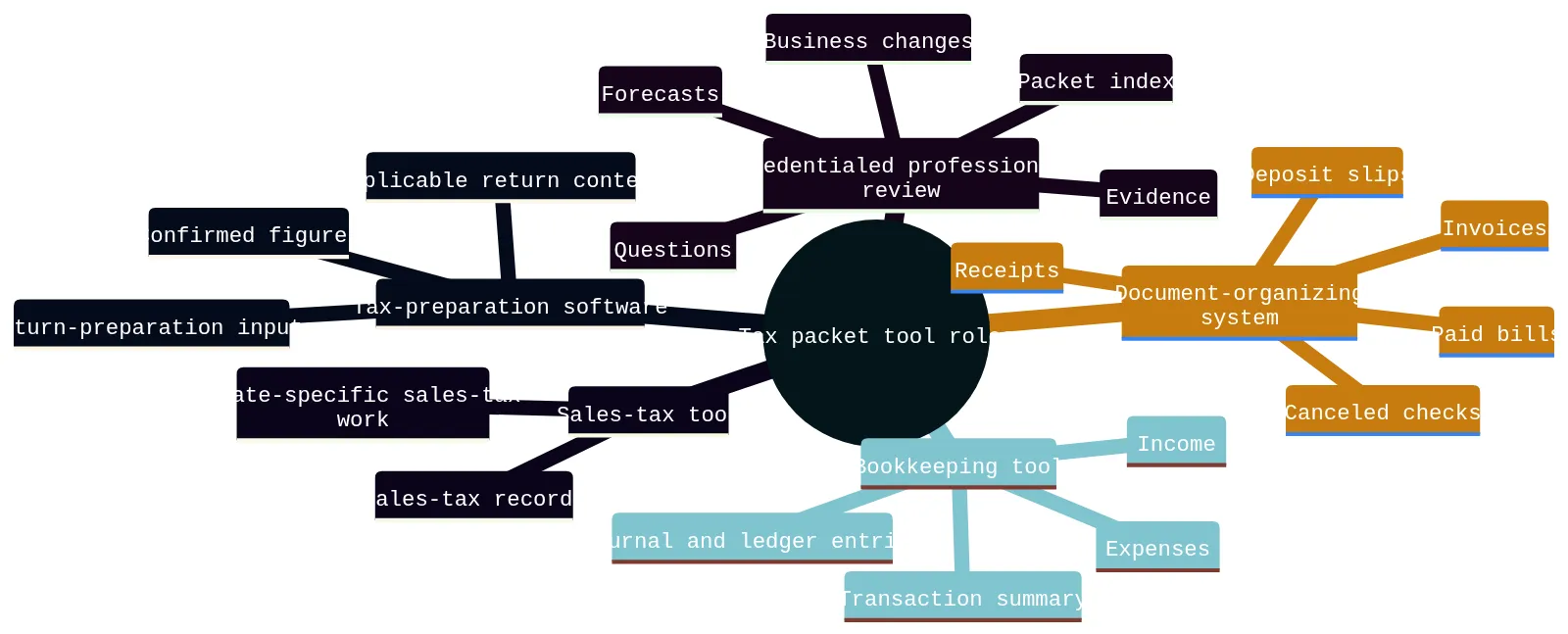
    A mind map showing five tax packet tool roles: bookkeeping, document organization, tax-preparation software, sales-tax tools, and credentialed professional review.
    Use different tool categories for different parts of the tax-planning review packet.

    Match the program type to your entity, period, and return context

    Before comparing program screens, identify two facts: which entity generated the activity and which period the packet covers. Put both at the top of your packet index. If you operate more than one business, keep records separate by business rather than combining activity because it shares an owner or bank login.

    Your entity and return context narrow the field. According to Quicken, most consumer-facing tools handle an individual Form 1040 that may include Schedule C business income, rather than separate entity-level returns for partnerships, S corporations, or C corporations. Quicken also states that TurboTax Business desktop and TaxAct business products handle entity returns separately from personal returns. These are category-level starting points, not a current eligibility determination. Confirm applicable-year forms, entity support, state availability, and product scope directly with the vendor before relying on a program.

    Use this decision boundary:

    • Single-owner activity tied to an individual return: a consumer-facing individual-return tool may be worth evaluating if your records are complete and the situation is straightforward. Confirm current form support.
    • Separate partnership, S-corporation, or C-corporation return context: begin with programs that explicitly support the separate entity return for the applicable year. Do not assume an individual-return product covers it.
    • More than one entity or a recent entity change: maintain separate folders, separate transaction summaries, and separate question lists. Ask a credentialed tax professional how the facts should be handled.
    • Unclear entity or period: pause program selection. Mark the item Needs confirmation and establish the entity and period first.

    A tax program may ask questions efficiently, but it cannot repair a packet that mixes entities, combines years, or substitutes estimates for records.

    Use five questions to narrow your tax prep program options

    Use this path before committing time to a specific program.

    1. What entity and period does this packet cover? Write the legal or operating entity name used in your records and the exact tax year or other review period. If business activity changed entities during the period, keep the change visible and add a professional-review question.

    2. Are the bookkeeping records complete enough to summarize activity? Identify the transaction summary, the accounts included, and any unreconciled or uncategorized activity. Do not use a tax program as a substitute for locating the underlying bookkeeping records.

    3. Can you find prior-year documents? Prior-year documents provide context for the next review. Compatibility can change by version and return type, so confirm current import limitations before making it a deciding factor.

    4. Do you need professional review rather than software prompts alone? A program may be a preparation tool, while a credentialed tax professional reviews the factual context and questions. This matters when records are incomplete, the entity is unclear, activity spans locations, or a business change needs discussion.

    5. Does the vendor currently support this exact use? Confirm the applicable tax year, entity return type, state scope, imports, service limits, and any professional-assistance boundaries. For example, TurboTax lists current limitations for its Expert Assist Business and Expert Full Service Business products that include C corporations and entities electing C-corporation treatment, trusts and estates, tax-exempt entities or nonprofits, and returns requiring more than five state filings. Treat vendor statements as product-specific and time-sensitive.

    If one answer remains uncertain, your next step is not to guess. Add the uncertainty to the packet index, assign a follow-up owner, and bring it to professional review.

    Build a tax-planning review packet index for records and questions

    Use a tax-planning review packet index as a program-selection record, not as a filing checklist. Its purpose is to show which information is ready for a program, which material remains supporting evidence, and which items should go to a credentialed tax professional before you select a product.

    Information group Selection question What to record
    Transaction summary Does the program fit the entity and period shown in the summary? Entity, period, report name, and included accounts
    Supporting documents Can the source material remain retrievable outside the program? Source location and related transaction group
    Prior-year documents Is a usable prior-year file format available for the program you are considering? Return type, tax year, and file format
    Forecasts and open questions Should this stay outside completed-period preparation pending review? Assumption or factual question, period, and follow-up owner

    For every row, record the entity, period, source, status, file location, and follow-up owner. This makes the program decision depend on the information you actually hold rather than on a broad product description.

    Use the index to define program inputs

    Transaction summaries identify the preparation context. The IRS says a suitable recordkeeping system clearly shows income and expenses and includes a transaction summary, ordinarily in books such as journals and ledgers. Identify the summary for the selected entity and period before evaluating program prompts.

    Supporting documents remain evidence. Keep the source files connected to the related transaction summary.
    Prior-year files are only one comparison factor. Note whether you have a prior-year data file, PDF return, or scanned paper return. Confirm current version and return-type limitations before using any prior-year import capability as a deciding factor.

    Forecasts are not completed-period inputs. Record the forecast period and source, then keep unresolved questions available for credentialed professional review. A program choice should not turn a forecast or an unanswered question into a documented fact.

    Keep Ready, Missing, and Needs confirmation items separate

    Apply an input-boundary test to each information group before using it to compare or enter information in a tax-preparation workflow. This is not a conclusion about tax treatment. It identifies whether the item helps establish program fit, remains evidence, or requires professional review.

    Input boundary Use it when Effect on program selection
    Ready to evaluate The item has an identified source and belongs to one entity and period Compare the program against the applicable input and return context
    Evidence retained The file supports a figure or explains activity Keep it retrievable with the related transaction summary
    Needs confirmation The entity, period, purpose, amount, or factual context is unclear Do not treat a program prompt as an answer to the question
    Source unavailable Expected material is unavailable Record what is absent before relying on the information
    Outside this comparison The item belongs to another entity or period, or does not apply Exclude it from this program decision and retain the reason

    For example, an account-statement payment can show that a payment occurred while its business purpose still needs confirmation. A projected equipment purchase belongs in a forecast discussion, not in completed-period asset information. A remembered expense without available support should remain marked Source unavailable rather than becoming a program entry.

    It also says that retention depends on what a document records and that records must be kept as long as needed to prove income or deductions on a return.

    This test distinguishes a program-selection decision from a record-review process. Select a program only when you can identify the entity and period it must address, the information it may receive, the evidence that stays available, and the questions that remain for professional confirmation.

    Recognize what tax software cannot settle

    Treat the limits of a program as part of the selection decision. Commercial tax-preparation software can support electronic filing, and the IRS describes commercial software as using a question-and-answer format. Those functions organize preparation only after you identify the correct entity, period, and available information.

    Use three stop checks before relying on a program answer:

    1. Input stop: Do you have a documented answer for this prompt? FreeTaxUSA states that users are responsible for complete and accurate entries and that it does not assume liability for user-generated errors.
    2. Context stop: Does the answer belong to this entity, period, and return context? A prompt cannot resolve mixed-entity records, a missing source document, or an unclear business change.
    3. Scope stop: Is this the right workflow for the obligation in question? Quicken distinguishes annual federal and state income-tax preparation software from sales-tax compliance software; do not assume one workflow completes the other.

    Nor does a program’s ability to accept an entry establish that the entry is complete or supported.

    CNBC Select states that a CPA or other tax professional offers customized care that tax software cannot replicate. For Texas franchise tax, nexus, entity changes, locations, or out-of-state activity, document the relevant facts and use professional review to confirm what those facts mean. Do not select an answer merely because a generic program prompt appears to fit.

    Choose a program with defined input boundaries

    Choose among tax prep program types by defining the preparation boundary first. Identify the entity and period, locate the transaction summary, and decide whether the available information belongs in a preparation workflow, remains supporting evidence, or needs professional confirmation.

    A tax-planning review packet supports that decision without becoming the decision itself. Use the packet index to compare each program against the inputs you have, not to assume that every file belongs in the program. Keep forecasts separate from completed-period information, and leave unavailable or unclear material visible. For electronic records, IRS Publication 583 says a storage system must index, store, preserve, retrieve, and reproduce records in legible format.

    Bring these professional-review questions when relevant:

    • What facts should we provide about Texas franchise tax?
    • Do our activities, customers, locations, or out-of-state operations raise a nexus question?
    • Did an entity change, new location, or business expansion create information that needs review?
    • Which missing records or unclear payments should be resolved before preparation proceeds?

    The useful outcome is not a universal program recommendation. It is a program type selected for a defined entity, period, and preparation context, with evidence and unresolved questions kept available for credentialed tax professional review.

    Frequently asked questions about tax prep programs and review packets

    What should I put in a tax-planning review packet before a meeting?

    Label each item by entity, period, source, status, and follow-up owner so the reviewer can see what is documented and what still needs confirmation.

    How do I tell whether a tax prep program fits my business entity?

    Start with the entity that created the activity and the period the packet covers. Consumer-facing tools often handle individual returns with business income, while separate entity returns need products that explicitly support that return type for the applicable year. Confirm current form support before relying on any program.

    Can bookkeeping software replace tax-preparation software?

    No. Bookkeeping tools summarize transactions and help you keep the source records organized. Tax-preparation software uses the information you enter to prepare return inputs. Keep the two jobs separate so your records stay usable for professional review.

    What should stay marked as missing or needs confirmation?

    Anything without a readable source, a clear period, or a clear business purpose should stay visible as missing or needs confirmation. Do not fill gaps with estimates, memory, or assumed treatment. That keeps the packet honest and easier to review.

    What records are most important for receipts, payroll, and assets?

    For payments and expenses, keep proof of payment, dates, amounts, payee details, and a description of the item or service. For payroll and contractor records, keep the available payroll materials and related payment records. For assets, keep the records needed to identify the property and support depreciation or sale calculations.

    When should I raise Texas franchise tax, nexus, or location questions?

    Bring them up whenever the business has Texas activity, out-of-state activity, entity changes, or new locations. Document the facts in the packet and ask the credentialed tax professional to confirm the tax implications rather than guessing from the software.

  • C Corp vs. S Corp: A Review-Packet Comparison for Your Accountant Meeting

    C Corp vs. S Corp: A Review-Packet Comparison for Your Accountant Meeting

    Start by separating entity form from federal tax treatment

    The useful first question is not “Which label is better?” It is “What is this business legally organized as, and what federal tax treatment is currently in place?” Those are related facts, but they are not interchangeable.

    An LLC is an entity created under state law. For federal income-tax purposes, its treatment can depend on member count and elections. A domestic LLC with two or more members generally defaults to partnership treatment unless it elects corporate treatment on Form 8832. A single-member LLC generally defaults to disregarded-entity treatment unless it makes that election. An eligible LLC that timely elects S corporation treatment on Form 2553 is generally deemed to have elected corporate classification, subject to applicable requirements.

    That means an LLC should not be assumed to be automatically a C corporation or an S corporation. Its federal income-tax classification also does not, by itself, settle employment-tax and certain excise-tax treatment.

    Start the review packet with confirmed facts, not conclusions. Record the entity form reported by the owner, the source for that information, the federal return filed for the prior year, and any available election records. If those facts conflict or are incomplete, document the uncertainty and send it to a credentialed professional. Do not ask a record organizer to determine entity status.

    Put these items at the front of the packet:

    • Entity form reported by the owner, such as corporation or LLC.
    • Source for that statement, such as formation records, prior-year return, or owner-provided records.
    • Federal return filed for the most recent year, if available.
    • Any available Form 8832 or Form 2553 records.
    • Ownership list and changes during the period.
    • A short note identifying what is confirmed, missing, or unclear.

    A useful index entry might read: “Entity form reported: LLC. Source: owner statement and prior-year return. Federal treatment shown on return: needs credentialed-professional confirmation.” That preserves the fact without asserting a filing result.

    Compare federal tax reporting and shareholder tax items

    The central federal difference is how the business and its shareholders report income-tax items. It is not, by itself, a recommendation for either treatment.

    Shared criterion C corporation treatment S corporation treatment What to bring for review
    Federal taxpayer A C corporation is a separate taxpayer for federal income-tax purposes. An S corporation elects federal pass-through treatment for income, losses, deductions, and credits. Prior-year federal return and current entity records.
    Federal return A C corporation’s federal income-tax return is Form 1120. Complete prior-year return, extensions, and available workpapers.
    Shareholder reporting The corporation reports its own taxable income. Shareholders report allocated flow-through income and losses on personal returns, subject to individual tax rates. Shareholder list and each available Schedule K-1.
    Distributions The IRS describes corporate profit as taxed to the corporation when earned and again to shareholders when distributed as dividends. The corporation does not deduct dividends it distributes. A Schedule K-1 reports each shareholder’s share of specified corporate tax items. A distribution amount may require separate basis review. Distribution records, board or owner records, and bank support.
    Corporate losses The IRS states that shareholders cannot deduct a C corporation’s loss. Loss and deduction items can be limited by shareholder stock and debt basis. Prior-year basis records, loans, and loss carryforward information.

    This comparison explains why a simple comparison of business income is not enough. The accountant will need to see who owns the business, what was filed before, whether income was retained or distributed, and what shareholder-level records exist.

    For a small-business owner, the practical task is to separate business-level records from shareholder-level records. Place the Form 1120 or Form 1120-S in the prior-year section. Keep Schedule K-1 materials with the shareholder section. Then label each document with its tax year, entity, owner where relevant, and source location.

    Do not treat a tax forecast as a confirmed historical record. A forecast can show expected income, planned distributions, anticipated expenses, or cash needs. It should be clearly labeled with the period, assumptions, preparer, and date created. A credentialed professional can then compare the forecast with completed bookkeeping records and prior-year filings.

    S corporation eligibility limits to verify

    S corporation treatment comes with federal eligibility requirements that should be verified before anyone reaches a conclusion. The IRS lists domestic-corporation status, allowable shareholders, a maximum of 100 shareholders, and one class of stock among the requirements. Allowable shareholders include individuals and certain trusts and estates; partnerships, corporations, and nonresident aliens are excluded. The IRS also identifies certain financial institutions, insurance companies, and domestic international sales corporations as ineligible.

    These limits make ownership facts a central part of the comparison. If the business has changing ownership, entity investors, prospective investors, trusts, different economic rights, or uncertainty about stock terms, put those facts in the open-question list. Do not resolve eligibility from a spreadsheet or an informal owner conversation.

    Prepare these ownership facts for the accountant meeting:

    • Names of current and former owners during the review period.
    • Ownership percentages and effective dates, if available.
    • Whether any owner is an individual, trust, estate, partnership, corporation, or another type of entity.
    • Available stock, membership, or ownership agreements.
    • Any planned ownership transfer, new investor, redemption, or change in economic rights.
    • Any question about whether the business has more than one class of stock.

    The IRS states that Form 2553, signed by all shareholders, is required to make an S corporation election. Applicability and timing should be verified by a credentialed professional. The right packet action is to include available election documents and identify missing signatures, dates, or ownership facts for review.

    Flag basis, distributions, and loss limits for professional review

    Pass-through treatment does not settle every shareholder tax question. The IRS identifies certain built-in gains and passive income taxes that can apply at the S corporation level. At the shareholder level, basis can matter when distributions, losses, deductions, or shareholder loans are involved.

    An S corporation Schedule K-1 can show a non-dividend distribution amount without determining its taxable amount. The IRS states that the taxable amount of a distribution depends on the shareholder’s stock basis. It also states that stock basis changes each year and must be computed annually. Loss and deduction items are limited by shareholder stock and debt basis; items disallowed because of those limitations are carried forward.

    These are reasons to preserve the records, not reasons to make a self-directed tax conclusion. A distribution is not fully explained by its bank transfer alone, and a K-1 is not a substitute for the supporting basis history.

    Flag these items for credentialed-professional review:

    • Prior-year Schedule K-1 forms and shareholder tax records.
    • Any available stock-basis or debt-basis schedules.
    • Shareholder loans, repayments, and supporting agreements.
    • Distributions by date, amount, recipient, and bank-record location.
    • Prior-year losses, deductions, or carryforward information.
    • Questions about whether a distribution, loss, or deduction has a particular tax result.

    Use factual wording in the question list. For example: “Distribution of $[amount] to [owner] on [date]; bank record in folder [location]; please review shareholder basis implications.” Do not label it taxable or nontaxable in the packet.

    Assemble a review packet that supports the comparison

    A review packet is a meeting tool. It organizes evidence and questions so a credentialed professional can focus on the decisions that require judgment. The IRS identifies good recordkeeping as a factor that can make tax filing easier.

    Build one index, but separate its contents into five statuses: confirmed historical records, supporting source documents, tax forecasts, missing items, and open questions. A payment is confirmed only when supporting evidence is available. When records are incomplete, retain what you have and mark the gap rather than filling it with an assumption.

    Use these index columns for each item: section, entity, period, account or owner, amount where relevant, source document, document location, status, missing-document owner, and credentialed-professional question.

    1. Entity and ownership

    Include entity records, ownership information, prior election documents if available, and a list of changes. Mark conflicting information as an open question.

    2. Prior-year materials

    Include the prior-year return, available schedules, Schedule K-1 forms where applicable, extensions, notices, and prior basis schedules. Keep the original source document with the index entry.

    3. Income and expenses

    Include reconciled bookkeeping records, bank and payment-platform summaries, and source documents supporting material entries. Separate completed records from current-year forecasts.

    4. Payroll and contractors

    Keep employee wage and payroll records separate from contractor payment records. This packet workflow uses separate record groups so classification questions remain visible for review. Include available payroll reports, contractor invoices, payment support, and any unresolved classification questions.

    5. Estimated payments

    For each estimated-payment record, list the date, amount, source-identified period, payment system or payee, and location of the confirmation or bank record. If confirmation is missing, preserve the available record and label the item for follow-up.

    6. Asset activity

    For each asset, identify available purchase support, recorded cost, placed-in-service date if available, and applicable period. Asset records can be organized in the packet, but asset tax treatment should be reviewed by a credentialed professional.

    7. Tax forecast and cash needs

    Provide a dated forecast separately from historical bookkeeping records. Identify assumptions, planned purchases, expected income changes, expected owner cash needs, and the person who prepared the estimate.

    8. Open questions

    Place unresolved entity, ownership, payroll, distribution, estimated-payment, asset, Texas, and multistate issues in one list. Each question should point to its supporting documents.

    Example of a complete item: “Asset purchase; entity: [name]; period: [year]; recorded cost: $[amount]; invoice and payment record stored in Assets/Equipment; placed-in-service date: [date if available].”

    Example of a missing item: “Estimated payment shown in bookkeeping; amount: $[amount]; period: unclear; bank confirmation not located; owner assigned to retrieve support; credentialed-professional question: confirm treatment after records are located.”

    The difference is not whether every document is present today. It is whether the packet accurately distinguishes evidence from uncertainty.

    Document Texas and multistate activity without assuming a tax outcome

    For an Austin business, Texas franchise tax belongs on the question list when entity treatment is under discussion. Do not assume that a federal classification, an LLC label, or a prior filing pattern determines the current Texas outcome. Document the facts and ask a credentialed tax professional to review current Texas rules.

    For activity outside Texas, include where work was performed, where customers were located, where workers were located, and the applicable period. Add available contracts, invoices, payroll records, registration records, and correspondence that identify the location or dates. Those facts help the reviewer determine whether current multistate rules require further analysis.

    A concise entry can read: “Customer activity outside Texas: [state], [period], invoices in folder [location], customer location supported by available records; please review whether further multistate analysis is needed.” This is a request for review, not a statement of obligation.

    Questions to place in the packet:

    • Does the current Texas franchise-tax treatment require review for this entity and period?
    • Did the business have work, customers, workers, or other activity outside Texas during the period?
    • What records support each location and date range?
    • Did ownership, entity status, payroll, or filing history change during the period?
    • Are there any current-rule questions that need Texas or multistate analysis?

    A credentialed tax professional should evaluate these questions under current rules.

    Arrive ready for a focused professional conversation

    Begin a C corporation versus S corporation comparison with the entity record, prior federal return, ownership facts, shareholder materials, bookkeeping records, payroll and contractor records, asset activity, forecasts, and location facts. The packet helps separate record retrieval from tax determinations.

    Use the meeting to review documented ownership changes, planned investor or economic-rights changes, prior return history, distributions, shareholder loans, payroll records, expected owner cash needs, filing periods, Texas franchise tax, and multistate activity. These records help a credentialed professional identify which treatment questions warrant further analysis. For each unresolved issue, state the fact, identify its source, and name the requested reviewer rather than asserting a filing conclusion. Convert gaps and uncertainty into open questions.

    Preparation does not replace tax, legal, filing, or professional review. It gives the reviewer a clearer starting point and gives you a more focused conversation.


    Frequently asked questions before comparing C corp and S corp treatment

    How should I record whether my business is a C corporation or S corporation in the review packet?

    Record the entity form the owner reports, the source for that fact, and the most recent federal return or election record. If the information conflicts or is incomplete, mark it as an open question for credentialed-professional review.

    What is the main tax reporting difference between C corporation and S corporation treatment?

    A C corporation is taxed as a separate federal taxpayer and uses Form 1120. An S corporation generally passes income, losses, deductions, and credits through to shareholders, who report their share on personal returns through Schedule K-1 and related records.

    What ownership facts should I gather before asking about S corporation eligibility?

    Include current and former owners, ownership percentages, owner type, any available stock or ownership agreements, and any planned transfers or changes. Also flag anything that could affect the one-class-of-stock rule or the shareholder limit.

    How should I handle Texas franchise tax or activity outside Texas in the packet?

    Document the facts and leave the conclusion open. Note the entity, the period, where work or customers were located, and any supporting records, then ask a credentialed tax professional to review current Texas and multistate rules.

    Can I treat an LLC as a C corporation or S corporation without checking more facts?

    No. An LLC’s federal tax treatment depends on its elections and other facts, so it should not be assumed to fit either category automatically. Put the LLC records, elections, and any uncertainty in the packet for review.